登録日: 2025-01-03 更新日: 2025-01-04
前回は、 「VirtualBox 7.1.4」の「仮想マシン」を手動で作成して、BeOS R5 のコミュニティ版である「Haiku R1/beta5」をインストールしました。
-
今回は「Vagrant」で仮想マシンの「Haiku R1/beta5」を作成したいと思います:
日本語化がどうなるのか、「Haiku」ではやったことがないので、色々とトライしました。
-
その備忘録です。
-
-
-
使用したPC は、新しく購入した ミニPC「MINISFORUM NAB5」です。
プロセッサは「Core i5-12450H」で、メモリ 16GB、SSD 512GB です。
-
(注)リンクを戻るときはブラウザの左上の「←」をクリック
Android スマホであれば「ホーム」ボタン隣の「<」をタップ
-
-
目次
--- - --- - --- - --- - --- - --- - --- - --- - --- - --- - --- - --- - --- - --- - --- - --- - --- - --- - --- - --- - ---
-
参考にした投稿:
「VirtualBox 7.1.4」に「Haiku R1/beta5」をインストール〈H173-3〉
-
前回の作業:
「VirtualBox 7.1.4」に「Haiku R1/beta5」をインストール、その後〈H173-4〉
-
今回の内容:
10. 「Haiku」の仮想マシンに、「VirtualBox Guest Additions」をインストール:
11. 「VagrantFile」にて、「共有フォルダ」の指定を除外:
12. 「Haiku」にオススメの「アプリ」や「機能」をインストール:
-
参考:
-
-
-
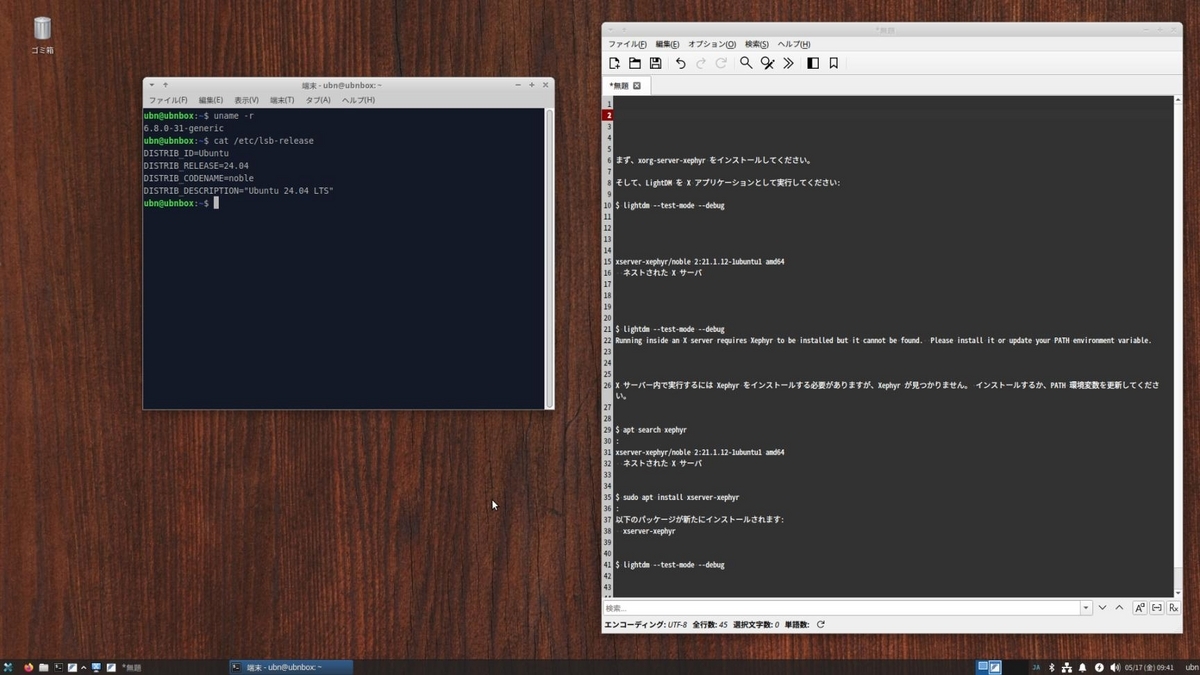
Xubuntu 24.04.1 LTS を立ち上げ:
--- - --- - --- - --- - --- - --- - --- - --- - --- - --- - --- - --- - --- - --- - --- - --- - --- - --- - --- - --- - ---
1). デスクトップ画面:
-
2). 「Vagrant」で仮想マシンの「 Haiku R1/beta5」を起動:
(1). GUI 表示するように Vagrantfile を修正後の画面:

→「仮想マシン」は、「英語」の環境です:
-
(2). 日本語化、および「VirtualBox Guest Additions」をインストール後の画面:

→「VBoxTray」を起動して常駐させる必要がありますが、 マウスで右下隅をドラッグするだけで画面サイズを自由に変更できます:
こちらの画面は、画面半分に調整しています。
-
画面右上のパネルの 2段めのシステムトレイに、2つのアイコンが追加されていることに注目:

→日本語入力の「mozc」のキーボードアイコンと、「VBoxTray」の青いボックスアイコンです。
-
左の「端末」画面にも注目:

→動かない「共有フォルダ」のマウントを無効にしたので、2つ目の赤い警告表示がありません。
1つ目の赤い警告表示は、「Vagrant」のプラグインの機能で、バージョンが合っているか「VirtualBox Guest Additions」のバージョンを確認したいけど、Haiku はサポートされていないのでやり方がわからない、というメッセージです:
-
ちなみに、Haiku ゲストの「VirtualBox Guest Additions」のバージョンと、
ホストOS の「VirtualBox」のバージョンが表示されていますが、同じ値ではありません。
バージョンが合っていないと、機能がうまく動かないこと(今回は「共有フォルダ」のマウントで失敗)があるようです:
-
-
現在のOS のバージョンを表示:
-
2025-01-03 現在
--- - --- - --- - --- - --- - --- - --- - --- - --- - --- - --- - --- - --- - --- - --- - --- - --- - --- - --- - --- - ---
ホストOS : 「Xubuntu 24.04.1 LTS」
カーネル:
$ uname -r
6.8.0-51-generic
→安定志向なので、更新の回数は少なめです:
-
リリース:
$ cat /etc/lsb-release
DISTRIB_ID=Ubuntu
DISTRIB_RELEASE=24.04
DISTRIB_CODENAME=noble
DISTRIB_DESCRIPTION="Ubuntu 24.04.1 LTS"
→LTS 版の更新(ポイントリリース)は、ほぼ 6ヶ月ぐらいです:
-
「x11」と「Wayland」のどちらで動作しているか確認:
$ echo $XDG_SESSION_TYPE
x11
→「Wayland」ではなく、「x11」で動作しています。
-
--- - --- - --- - --- - --- - --- - --- - --- - --- - --- - --- - --- - --- - --- - --- - --- - --- - --- - --- - --- - ---
ゲストOS : 「Haiku R1/beta5」
バージョン:
> uname -v
hrev57937+129 Dec10 2024 07:24
-
-
- --- - --- - --- - --- - --- - --- - --- - --- - -
VirtualBox について:
--- - --- - --- - --- - --- - --- - --- - --- - --- - --- - --- - --- - --- - --- - --- - --- - --- - --- - --- - --- - ---
「VirtualBox 」 は、Oracle が開発している「仮想マシン」を構築するためのソフトウェアです。
-
仮想マシンを使うことで、
ハードウェアで問題となるPC でも、最新のLinux ディストリビューションをインストールできる可能性が高くなります。
-
-
- --- - --- - --- - --- - --- - --- - --- - --- - --
Haiku について:
--- - --- - --- - --- - --- - --- - --- - --- - --- - --- - --- - --- - --- - --- - --- - --- - --- - --- - --- - --- - ---
Haiku は、特にパーソナル コンピューティングをターゲットとしたオープンソース オペレーティング システムです。 BeOS からインスピレーションを得た Haiku は、高速で使いやすく、習得も簡単でありながら、非常に強力です。
-
1). Haiku 公式ホームページ
-
2). Haiku のダウンロード:
-
(1). ビルド済みの 安定版のダウンロード:
-
(2). ビルド済みの 安定していないけど最新の開発版のダウンロード:
-
(3). 最新の Haiku のソース コード:
latest Haiku source code(index : haiku)
→「OS」のビルドにトライしたい方向け:
「OS」のビルド=(「OS」のビルド+プリインストールされている全ての「アプリ」のビルド):
自動化されていますが、時間がすごくかかります。
-
-
- --- - --- - --- - --- - --- - --- - --- - --- - ---
1. 前回の作業の続き:
--- - --- - --- - --- - --- - --- - --- - --- - --- - --- - --- - --- - --- - --- - --- - --- - --- - --- - --- - --- - ---
前回の作業:
「Xubuntu 24.04 LTS」に、「VirtualBox 7.1.4」と「Vagrant 2.4.3」をインストール〈H173 改〉
-
-
- --- - --- - --- - --- - --- - --- - --- - --- - ----
2. Vagrant の公式のBox サイトで「Haiku」を検索:
--- - --- - --- - --- - --- - --- - --- - --- - --- - --- - --- - --- - --- - --- - --- - --- - --- - --- - --- - --- - ---
Vagrant の公式のBox サイト:
「Haiku」で検索:
20230114
-
→「Haiku R1/beta4」しかありませんが、システム更新すれば「Haiku R1/beta5」にアップするかな。
-
Vagrantfile を作成してボックスを開始:
vagrant init haiku-os/r1beta4-x86_64 --box-version 20230114
-
仮想マシンを起動:
vagrant up
-
-
- --- - --- - --- - --- - --- - --- - --- - --- - -----
3. 「Vagrant」でBox から「仮想マシン」を作成:
--- - --- - --- - --- - --- - --- - --- - --- - --- - --- - --- - --- - --- - --- - --- - --- - --- - --- - --- - --- - ---
Box から「Haiku R1/beta4」をインストールしました:
-
1). ホストOS にて、「作業フォルダ」を作成:
$ mkdir -p ~/ダウンロード/vm/haiku5
-
2). 「Box」をダウンロード、および「Vagrantfile」を作成:
$ cd ~/ダウンロード/vm/haiku5
$ vagrant init haiku-os/r1beta4-x86_64
:
A `Vagrantfile` has been placed in this directory. You are now
ready to `vagrant up` your first virtual environment! Please read
the comments in the Vagrantfile as well as documentation on
`vagrantup.com` for more information on using Vagrant.
→ファルをひとつ作成するだけなので、すぐに応答が返ってきます:
-
確認:
$ ls -lA ~/ダウンロード/vm/haiku5
:
-rw-rw-r-- 1 ubn ubn 3397  1月  1 02:39 Vagrantfile
-
3). 仮想マシンの(初回の作成と)立ち上げ:
$ cd ~/ダウンロード/vm/haiku5
$ vagrant up
Bringing machine 'default' up with 'virtualbox' provider...
==> default: Box 'haiku-os/r1beta4-x86_64' could not be found. Attempting to find and install...
    default: Box Provider: virtualbox
    default: Box Version: >= 0
==> default: Loading metadata for box 'haiku-os/r1beta4-x86_64'
    default: URL: https://vagrantcloud.com/api/v2/vagrant/haiku-os/r1beta4-x86_64
==> default: Adding box 'haiku-os/r1beta4-x86_64' (v20230114) for provider: virtualbox
    default: Downloading: https://vagrantcloud.com/haiku-os/boxes/r1beta4-x86_64/versions/20230114/providers/virtualbox/unknown/vagrant.box
    default: Calculating and comparing box checksum...
==> default: Successfully added box 'haiku-os/r1beta4-x86_64' (v20230114) for 'virtualbox'!
==> default: Importing base box 'haiku-os/r1beta4-x86_64'...
==> default: Matching MAC address for NAT networking...
==> default: Checking if box 'haiku-os/r1beta4-x86_64' version '20230114' is up to date...
==> default: Setting the name of the VM: haiku5_default_1735666924757_81252
==> default: Clearing any previously set network interfaces...
==> default: Preparing network interfaces based on configuration...
    default: Adapter 1: nat
==> default: Forwarding ports...
    default: 22 (guest) => 2222 (host) (adapter 1)
==> default: Booting VM...
==> default: Waiting for machine to boot. This may take a few minutes...
    default: SSH address: 127.0.0.1:2222
    default: SSH username: vagrant
    default: SSH auth method: private key
    default:
    default: Vagrant insecure key detected. Vagrant will automatically replace
    default: this with a newly generated keypair for better security.
    default:
    default: Inserting generated public key within guest...
    default: Removing insecure key from the guest if it's present...
==> default: Machine booted and ready!
赤色で表示1:
Sorry, don't know how to check guest version of Virtualbox Guest Additions
on this platform. Stopping installation.
和訳:
申し訳ありませんが、このプラットフォームで Virtualbox Guest Additions の
ゲスト バージョンを確認する方法がわかりません。インストールを停止します。
==> default: Checking for guest additions in VM...
    default: No guest additions were detected on the base box for this VM! Guest
    default: additions are required for forwarded ports, shared folders, host only
    default: networking, and more. If SSH fails on this machine, please install
    default: the guest additions and repackage the box to continue.
    default:
    default: This is not an error message; everything may continue to work properly,
    default: in which case you may ignore this message.
==> default: Mounting shared folders...
    default: /home/ubn/ダウンロード/vm/haiku5 => /vagrant
赤色で表示2:
Vagrant attempted to execute the capability 'mount_virtualbox_shared_folder'
on the detect guest OS 'haiku', but the guest doesn't
support that capability. This capability is required for your
configuration of Vagrant. Please either reconfigure Vagrant to
avoid this capability or fix the issue by creating the capability.
ubn@ubnbox:~/ダウンロード/vm/haiku5$
→プロンプトが返りました:
-
和訳:
Vagrant は、ゲスト OS 'haiku' で 'mount_virtualbox_shared_folder' を実行
しようとしましたが、ゲストはその機能をサポートしていません。
この機能は Vagrant の構成に必要です。この機能を回避するように
Vagrant を再設定するか、機能を作成して問題を解決してください。
「Virtualbox Guest Additions」の自動インストールと、「共有フォルダ」の自動マウントに失敗したみたい。
-
ウィンドウの表示がないので、正常に「仮想マシン」が立ち上がったのかわからないので、確認:
$ vagrant status
:
Current machine states:

default                   running (virtualbox)
→「仮想マシン」は起動していますが、GUI 画面が表示されません:
vagrant の公式Box の場合、ssh 接続がメインなのか、ほとんどが GUI 表示オフです:
-
4). Vagrantfile の設定を修正:
-
(1). 「仮想マシン」の停止:
$ vagrant halt
==> default: Attempting graceful shutdown of VM...
ubn@ubnbox:~/ダウンロード/vm/haiku5$
-
$ pwd
/home/ubn/ダウンロード/vm/haiku5
$ ls
Vagrantfile
$ ls -1A
.vagrant
Vagrantfile
-
(2). 「Vagrantfile」ファイルを修正:
$ nano Vagrantfile
一部を抜粋:
  #
  # config.vm.provider "virtualbox" do |vb|
  #   # Display the VirtualBox GUI when booting the machine
  #   vb.gui = true
  #
  #   # Customize the amount of memory on the VM:
  #   vb.memory = "1024"
  # end
  #
↓ 下記に修正:(コメントを 3つ解除)
  #
   config.vm.provider "virtualbox" do |vb|
  #   # Display the VirtualBox GUI when booting the machine
     vb.gui = true
  #
  #   # Customize the amount of memory on the VM:
  #   vb.memory = "1024"
   end
  #
Ctrl+O で保存先を確認して、Enter
Ctrl+X で終了
-
(3). 正しく修正されたか確認:
$ cat Vagrantfile
-
5). ホストOS を再起動:
「端末」以外のすべての画面を閉じてから、
$ reboot
-
6). 「仮想マシン」に(GUI 表示するように)修正した Vagrantfile を反映:
$ cd ~/ダウンロード/vm/haiku5
$ vagrant reload
==> default: Checking if box 'haiku-os/r1beta4-x86_64' version '20230114' is up to date...
==> default: Clearing any previously set forwarded ports...
==> default: Clearing any previously set network interfaces...
==> default: Preparing network interfaces based on configuration...
    default: Adapter 1: nat
==> default: Forwarding ports...
    default: 22 (guest) => 2222 (host) (adapter 1)
==> default: Booting VM...
==> default: Waiting for machine to boot. This may take a few minutes...
    default: SSH address: 127.0.0.1:2222
    default: SSH username: vagrant
    default: SSH auth method: private key
==> default: Machine booted and ready!
赤色の警告1:
Sorry, don't know how to check guest version of Virtualbox Guest Additions
on this platform. Stopping installation.
==> default: Checking for guest additions in VM...
    default: No guest additions were detected on the base box for this VM! Guest
    default: additions are required for forwarded ports, shared folders, host only
    default: networking, and more. If SSH fails on this machine, please install
    default: the guest additions and repackage the box to continue.
    default:
    default: This is not an error message; everything may continue to work properly,
    default: in which case you may ignore this message.
==> default: Mounting shared folders...
    default: /home/ubn/ダウンロード/vm/haiku5 => /vagrant
赤色の警告2:
Vagrant attempted to execute the capability 'mount_virtualbox_shared_folder'
on the detect guest OS 'haiku', but the guest doesn't
support that capability. This capability is required for your
configuration of Vagrant. Please either reconfigure Vagrant to
avoid this capability or fix the issue by creating the capability.
ubn@ubnbox:~/ダウンロード/vm/haiku5$
→「仮想マシン」のウィンドウが表示されました:
スクロールバーが付いているので、画面調整:
「View」→「Adjust Window Size」
→「仮想マシン」は、「英語」の環境です:
「ログイン」画面なし、パスワードなしで、直接「デスクトップ」画面が表示されました:
vagrant の公式 Box だと普通です:
-
「ロケール」の設定を確認:

-
「Screen」アプリで確認すると、解像度 (1024 x 768) でした:

↓ 上記以外の解像度も選べます:

解像度を「1280 x 1024」に設定:
-
7). 「仮想マシン」の停止:
$ vagrant halt
:
==> default: Attempting graceful shutdown of VM...
==> default: Forcing shutdown of VM...
ubn@ubnbox:~/ダウンロード/vm/haiku5$
-
「仮想マシン」の確認:
$ vagrant status
:
Current machine states:

default                   poweroff (virtualbox)
-
8). 「仮想マシン」の情報の確認:
-
ローカルに登録されている Box:
$ vagrant box list
:
aaronvonawesome/ubuntu-2404-cinnamon (virtualbox, 1.0.2, (amd64))
haiku-os/r1beta4-x86_64              (virtualbox, 20230114)      ←「今回」
-
「VirtualBox」が管理している「仮想マシン」(イメージが置かれているフォルダ):
$ ls -1 ~/'VirtualBox VMs'
:
Haiku
UbuntuCN24-04
haiku5_default_1735666924757_81252  ←「Vagrant」が管理
ubn2404_default_1732203971971_45140  ←「Vagrant」が管理
「仮想マシン」名をよく見ると、下記の情報の一部が使われていることに気付きます:
なので、ひと目でわかるように vagrant の「作業フォルダ」名は工夫する必要があります:
-
「Vagrant」が管理している「仮想マシン」:
$ vagrant global-status
:
ubn@ubnbox:~$ vagrant global-status
id       name    provider   state   directory
------------------------------------------------------------------------
37b9301  default virtualbox running /home/ubn/ダウンロード/vm/ubn2404
d376608  default virtualbox running /home/ubn/ダウンロード/vm/haiku5     ←「今回」
-
状態は「running」ですが、反映のタイミングは遅れることがあるので、
現在の状態の確認には、表示の作業フォルダに移動してから「vagrant status」を使うのが確実です:
$ cd /home/ubn/ダウンロード/vm/haiku5
$ vagrant status
:
Current machine states:

default                   poweroff (virtualbox)
-
-
- --- - --- - --- - --- - --- - --- - --- - --- - ----- -
4. 「VirtualBox マネージャ」で、「仮想マシン」の設定を確認
--- - --- - --- - --- - --- - --- - --- - --- - --- - --- - --- - --- - --- - --- - --- - --- - --- - --- - --- - --- - ---
-
1). 「VirtualBox マネージャ」を起動:
手動でインストールした「Haiku」の設定:

-

-
2). 「仮想マシン」の設定値を PC の性能に合わせて変更しました:
システム
メインメモリー: 「1024 MB」 →「7104 MB」に変更
プロセッサー: 「2」 →「8」に変更
-
ディスプレイ
ビデオメモリー: 「10 MB」 →「128 MB」に変更
-
3). 「仮想マシン」の設定で、(上記を除いた)手動で作成した設定と違うところ:
-
システム
「マザーボード」タブ:
起動順序: 「光学」にチェックなし →「チェック」に変更 ←「光学ドライブを追加しました」

ポインティングデバイス: 「USB タブレット」          ←「そのまま」

拡張機能:
「I/O APIC を有効化」にチェックあり
「ハードウェアクロックをUTCに」にチェックあり        ←「そのまま」で様子見
「EFI を有効化」にチェックなし
-
ディスプレイ
「スクリーン」タブ:
グラフィックコントローラー: 「VBoxVGA」              ←「そのまま」で様子見
拡張機能: 「3Dアクセラレーションを有効化」にチェックなし ←「そのまま」で様子見
-
ストレージ
デバイス:
「box-disk001.vmdk」のディスクのみの登録:
→右上の左のアイコン(光学ドライブの追加)をクリック ←「光学ドライブを追加しました」
「メディアの選択」画面が表示:
→右下の「空のままにする」をクリック:
-
オーディオ
「オーディオを有効化」にチェックあり
ホストオーディオドライバー: 「PulseAudio」 ←「そのまま」で様子見
拡張機能: 「オーディオ出力を有効化」にチェックあり
「オーディオ入力を有効化」にチェックなし
-
ネットワーク
「アダプター1」タブ:
「ネットワークアダプターを有効化」にチェックあり
割り当て: 「NAT」
アダプタータイプ: 「準仮想化ネットワーク(virtio-net)」 ←「そのまま」で様子見
MACアドレス: 「xxxxxx」ランダムの値
「ケーブル接続」にチェックあり
「ポートフォワーディング」
-
4). 「VirtualBox マネージャ」を右上の「x」で閉じました:
-
参考:「Ubuntu Cinnamon 24.04 LTS」が動く「仮想マシン」の設定:
- ディスプレイ→「スクリーン」タブ→「グラフィックコントローラー」:
 「VMSVGA」で、「3Dアクセラレーション」にチェック:

- システム→「アクセラレーション」タブ:
 「デフォルト」で、「ネステッドページンクを有効化」にチェック:
→「Haiku」の場合は、上記の設定とは関係なし:
-
-
- --- - --- - --- - --- - --- - --- - --- - --- - ----- --
5. 「ssh 接続」して確認:
--- - --- - --- - --- - --- - --- - --- - --- - --- - --- - --- - --- - --- - --- - --- - --- - --- - --- - --- - --- - ---
-
1). 「仮想マシン」を通常立ち上げ:
$ cd ~/ダウンロード/vm/haiku5
$ vagrant up
Bringing machine 'default' up with 'virtualbox' provider...
==> default: Checking if box 'haiku-os/r1beta4-x86_64' version '20230114' is up to date...
==> default: Clearing any previously set forwarded ports...
==> default: Clearing any previously set network interfaces...
==> default: Preparing network interfaces based on configuration...
    default: Adapter 1: nat
==> default: Forwarding ports...
    default: 22 (guest) => 2222 (host) (adapter 1)
==> default: Booting VM...
==> default: Waiting for machine to boot. This may take a few minutes...
    default: SSH address: 127.0.0.1:2222
    default: SSH username: vagrant
    default: SSH auth method: private key
==> default: Machine booted and ready!
赤色の警告1:
Sorry, don't know how to check guest version of Virtualbox Guest Additions
on this platform. Stopping installation.
==> default: Checking for guest additions in VM...
    default: No guest additions were detected on the base box for this VM! Guest
    default: additions are required for forwarded ports, shared folders, host only
    default: networking, and more. If SSH fails on this machine, please install
    default: the guest additions and repackage the box to continue.
    default:
    default: This is not an error message; everything may continue to work properly,
    default: in which case you may ignore this message.
==> default: Mounting shared folders...
    default: /home/ubn/ダウンロード/vm/haiku5 => /vagrant
赤色の警告2:
Vagrant attempted to execute the capability 'mount_virtualbox_shared_folder'
on the detect guest OS 'haiku', but the guest doesn't
support that capability. This capability is required for your
configuration of Vagrant. Please either reconfigure Vagrant to
avoid this capability or fix the issue by creating the capability.
ubn@ubnbox:~/ダウンロード/vm/haiku5$
→「仮想マシン」が立ち上がり、ウィンドウが表示されました:
-
「仮想マシン」の確認:
$ vagrant status
Current machine states:

default                   running (virtualbox)
-
2). 参考: 「ssh 接続」の設定を確認:
こちらの操作は要りません。確認のみです:
$ vagrant ssh-config
:
Host default
  HostName 127.0.0.1
  User vagrant
  Port 2222
  UserKnownHostsFile /dev/null
  StrictHostKeyChecking no
  PasswordAuthentication no
  IdentityFile /home/ubn/ダウンロード/vm/haiku5/.vagrant/machines/default/virtualbox/private_key
  IdentitiesOnly yes
  LogLevel FATAL
  PubkeyAcceptedKeyTypes +ssh-rsa
  HostKeyAlgorithms +ssh-rsa
→これは、Linux の「ssh」コマンドで接続するときに必要となる「情報」です:
-
3). ssh 接続:
$ cd ~/ダウンロード/vm/haiku5
$ vagrant ssh
Welcome to the Haiku shell.
~>
→すぐにプロンプトが変わりました:
~> pwd
/boot/home
~> uname -a
Haiku shredder 1 hrev56578+65 Jan 14 2023 07:13: x86_64 x86_64 Haiku
~> uname -v
hrev56578+65 Jan 14 2023 07:13:
~>
-
4). sudo の動作を確認:
~> sudo ls
-bash: sudo: command not found
→「Haiku」には管理者権限がないので、「sudo」コマンドはありません:
-
5). ゲストOS の状態を確認:
-
(1). 「uname」コマンドのヘルプを表示:
~> uname --help
:
Usage: uname [OPTION]...
Print certain system information.  With no OPTION, same as -s.

  -a, --all                print all information, in the following order,
                             except omit -p and -i if unknown:
  -s, --kernel-name        print the kernel name
  -n, --nodename           print the network node hostname
  -r, --kernel-release     print the kernel release
  -v, --kernel-version     print the kernel version
  -m, --machine            print the machine hardware name
  -p, --processor          print the processor type (non-portable)
  -i, --hardware-platform  print the hardware platform (non-portable)
  -o, --operating-system   print the operating system
      --help        display this help and exit
      --version     output version information and exit

GNU coreutils online help: <https://www.gnu.org/software/coreutils/>
Report any translation bugs to <https://translationproject.org/team/>
Full documentation <https://www.gnu.org/software/coreutils/uname>
or available locally via: info '(coreutils) uname invocation'
-
すべての情報を以下の順で表示:
ただし、不明な場合は -p と -i を省略
~> uname -a
Haiku shredder 1 hrev56578+65 Jan 14 2023 07:13: x86_64 x86_64 Haiku
→「-i」は不明なので省略されています:
-
カーネル名:
~> uname -s
Haiku
-
ネットワークノードのホスト名:
~> uname -n
shredder
-
カーネルリリース名:
~> uname -r
1
-
カーネルのバージョン:
~> uname -v
hrev56578+65 Jan 14 2023 07:13:
-
マシンのハードウェア名:
~> uname -m
x86_64
-
プロセッサのタイプ:
~> uname -p
x86_64
-
ハードウェアのプラットフォーム:
~> uname -i
unknown
-
オペレーティング·システム:
~> uname -o
Haiku
→「-o」(小文字のオー)
-
(2). 「locale」のコマンドのヘルプを表示:
~> locale --help
:
Usage: locale [-alftcm]
  -a, --all     Print all available languages
  -l, --language    Print the currently set preferred language
  -f, --format      Print the formatting-related locale
  -t, --time        Print the time-related locale
  -c, --message     Print the message-related locale
  -m, --charmap     List available character maps
  -h, --help        Display this help and exit
-
利用可能なすべての言語を表示:
~> locale -a
af.UTF-8
:
en.UTF-8
:
ja.UTF-8
ja_JP.UTF-8
:
zu.UTF-8
zu_ZA.UTF-8
POSIX
→「C」がないことに注目:
-
現在設定されている優先言語を表示:
~> locale -l
:
en
-
書式設定関連のロケールを表示:
~> locale -f
:
en.UTF-8
-
時間関連のロケールを表示:
~> locale -t
:
en.UTF-8
-
メッセージ関連のロケールを表示:
~> locale -c
:
en.UTF-8
-
利用可能な文字マップの一覧を表示:
~> locale -m
:
UTF-8
-
このヘルプを表示して終了
~> locale -h
-
6). 「Guest Additions」のバージョンを確認:
~>  modinfo vboxguest | grep ^version
-bash: modinfo: command not found
~> vboxguest --help
-bash: vboxguest: command not found
→コマンドがありません:
-
7). 「Guest Additions」の動作を確認:
~> pwd
/boot/home
-
~> ls -a
.  ..  config  Desktop  mail
→「Guest Additions」の動作は未確認:
-
-
- --- - --- - --- - --- - --- - --- - --- - --- - ----- ---
6. 「Haiku R1/beta4」にて、「システム更新」:
--- - --- - --- - --- - --- - --- - --- - --- - --- - --- - --- - --- - --- - --- - --- - --- - --- - --- - --- - --- - ---
ssh 接続でのコマンド操作で、「Haiku R1/beta4」を最新まで「システム更新」しました:
-
1). リポジトリの更新:
~> pkgman refresh
Fetching repository checksum from https://eu.hpkg.haiku-os.org/haiku/r1beta4/x86_64/current ...
Validating checksum for Haiku ...
Fetching repository-cache from https://eu.hpkg.haiku-os.org/haiku/r1beta4/x86_64/current ...
Validating checksum for Haiku ...
Activating repository cache for Haiku ...
Fetching repository checksum from https://eu.hpkg.haiku-os.org/haikuports/r1beta4/x86_64/current ...
*** failed! : Interrupted system call
~>
→すでに「Haiku R1/beta5」にアップしており、検索先のリポジトリが「r1beta4」なので、失敗しました:
-
2). 先に「システム更新」を実施:
インストール済みのパッケージのアップデート:
~> pkgman update
100% repochecksum-1 [65 bytes]
Validating checksum for Haiku...done.
Refreshing repository "HaikuPorts" failed  0%: Resource not found
The following changes will be made:
  in system:
    upgrade package haiku-r1~beta4_hrev56578_65-1 to r1~beta4_hrev56578_97-1 from repository Haiku
    upgrade package makefile_engine-r1~beta4_hrev56578_65-1 to r1~beta4_hrev56578_97-1 from repository Haiku
    upgrade package haiku_loader-r1~beta4_hrev56578_65-1 to r1~beta4_hrev56578_97-1 from repository Haiku
    upgrade package haiku_datatranslators-r1~beta4_hrev56578_65-1 to r1~beta4_hrev56578_97-1 from repository Haiku
    upgrade package haiku_devel-r1~beta4_hrev56578_65-1 to r1~beta4_hrev56578_97-1 from repository Haiku
    upgrade package webpositive-r1~beta4_hrev56578_65-1 to r1~beta4_hrev56578_97-1 from repository Haiku
Continue? [yes/no] (yes) :
「y」Enter、または、Enter で続行:
100% haiku-r1~beta4_hrev56578_97-1-x86_64.hpkg [39.08 MiB]
Validating checksum for https://eu.hpkg.haiku-os.org/haiku/r1beta4/x86_64/current/packages/haiku-r1~beta4_hrev56578_97-1-x86_64.hpkg...done.
100% makefile_engine-r1~beta4_hrev56578_97-1-any.hpkg [9.51 KiB]
Validating checksum for https://eu.hpkg.haiku-os.org/haiku/r1beta4/x86_64/current/packages/makefile_engine-r1~beta4_hrev56578_97-1-any.hpkg...done.
100% haiku_loader-r1~beta4_hrev56578_97-1-x86_64.hpkg [279.26 KiB]
Validating checksum for https://eu.hpkg.haiku-os.org/haiku/r1beta4/x86_64/current/packages/haiku_loader-r1~beta4_hrev56578_97-1-x86_64.hpkg...done.
100% haiku_datatranslators-r1~beta4_hrev56578_97-1-x86_64.hpkg [2.71 MiB]
Validating checksum for https://eu.hpkg.haiku-os.org/haiku/r1beta4/x86_64/current/packages/haiku_datatranslators-r1~beta4_hrev56578_97-1-x86_64.hpkg...done.
100% haiku_devel-r1~beta4_hrev56578_97-1-x86_64.hpkg [3.84 MiB]
Validating checksum for https://eu.hpkg.haiku-os.org/haiku/r1beta4/x86_64/current/packages/haiku_devel-r1~beta4_hrev56578_97-1-x86_64.hpkg...done.
100% webpositive-r1~beta4_hrev56578_97-1-x86_64.hpkg [1.34 MiB]
Validating checksum for https://eu.hpkg.haiku-os.org/haiku/r1beta4/x86_64/current/packages/webpositive-r1~beta4_hrev56578_97-1-x86_64.hpkg...done.
[system] Applying changes ...
[system] Changes applied. Old activation state backed up in "state_2025-01-01_08:49:11"
[system] Cleaning up ...
[system] Done.
A reboot is necessary to complete the installation process.
~>
和訳:
インストールプロセスを完了するには再起動が必要です。
-
確認:
~> uname -v
hrev56578+65 Jan 14 2023 07:13:
-
3). ssh 接続を抜けました:
~> exit
logout
ubn@ubnbox:~/ダウンロード/vm/haiku5$
-
4). 「仮想マシン」の停止:
$ vagrant halt
==> default: Attempting graceful shutdown of VM...
ubn@ubnbox:~/ダウンロード/vm/haiku5$
-
5). 「仮想マシン」を立ち上げ:
$ cd ~/ダウンロード/vm/haiku5
$ vagrant up
-
6). ssh 接続:
$ cd ~/ダウンロード/vm/haiku5
$ vagrant ssh
Welcome to the Haiku shell.
~>
-
参考: システム更新前の表示:
~> uname -a
Haiku shredder 1 hrev56578+65 Jan 14 2023 07:13: x86_64 x86_64 Haiku
~> uname -v
hrev56578+65 Jan 14 2023 07:13:
~>
-
確認:
~> uname -a
Haiku shredder 1 hrev56578+97 Aug  8 2024 06:02: x86_64 x86_64 Haiku
~> uname -v
hrev56578+97 Aug  8 2024 06:02:
→システム更新されましたが、これだけでは「Haiku R1/beta5」なのかはわかりません:
-
7). リポジトリの更新:
~> pkgman refresh
~> pkgman refresh
Fetching repository checksum from https://eu.hpkg.haiku-os.org/haiku/r1beta4/x86_64/current ...
Validating checksum for Haiku ...
Fetching repository checksum from https://eu.hpkg.haiku-os.org/haikuports/r1beta4/x86_64/current ...
*** failed! : Interrupted system call
~>
→やっぱり、「haikuports/r1beta4」を見に行きます:
-
8). 先に「システム更新」を実施:
インストール済みのパッケージのアップデート:
~> pkgman update
100% repochecksum-1 [65 bytes]
Validating checksum for Haiku...done.
Refreshing repository "HaikuPorts" failed  0%: Resource not found
Nothing to do.
~>
→「Haiku R1/beta4」は最新で、「システム更新」はもうないみたい:
-
「Haiku R1/beta4」を「Haiku R1/beta5」にアップグレードするには、
リポジトリ先を「Haiku R1/beta5」に修正する必要があります。
-
-
- --- - --- - --- - --- - --- - --- - --- - --- - ----- ----
7. 「Haiku R1/beta4」を「Haiku R1/beta5」にアップグレード:
--- - --- - --- - --- - --- - --- - --- - --- - --- - --- - --- - --- - --- - --- - --- - --- - --- - --- - --- - --- - ---
リポジトリ先を「Haiku R1/beta5」に修正しました:
-
「Haiku R1/beta4」からアップグレードする手順は、「Get Haiku!」を参照:
-
以前のバージョンの「Haiku R1/beta4」がインストールされている場合は、以下のアップグレード手順を参照:
警告: Beta 4 からのアップグレードのみがサポートされています。
ターミナルを使用していくつかのコマンドを発行します。
-
1). 既存の「Haiku」および「HaikuPorts」リポジトリを R1/beta5 の同等のリポジトリに置き換え:
~> pkgman add-repo https://eu.hpkg.haiku-os.org/haiku/r1beta5/$(getarch)/current
:
Fetching repository info from https://eu.hpkg.haiku-os.org/haiku/r1beta5/x86_64/current ...
Activating repository config from https://eu.hpkg.haiku-os.org/haiku/r1beta5/x86_64/current ...
A repository configuration for Haiku already exists.
overwrite? [yes/no] (no) :
→「yes」Enter 、で続行:
Fetching repository checksum from https://eu.hpkg.haiku-os.org/haiku/r1beta5/x86_64/current ...
Validating checksum for Haiku ...
Fetching repository-cache from https://eu.hpkg.haiku-os.org/haiku/r1beta5/x86_64/current ...
Validating checksum for Haiku ...
Activating repository cache for Haiku ...
~>
→完了:
-
~> pkgman add-repo https://eu.hpkg.haiku-os.org/haikuports/r1beta5/$(getarch)/current
:
Fetching repository info from https://eu.hpkg.haiku-os.org/haikuports/r1beta5/x86_64/current ...
Activating repository config from https://eu.hpkg.haiku-os.org/haikuports/r1beta5/x86_64/current ...
A repository configuration for HaikuPorts already exists.
overwrite? [yes/no] (no) :
→「yes」Enter 、で続行:
Fetching repository checksum from https://eu.hpkg.haiku-os.org/haikuports/r1beta5/x86_64/current ...
Validating checksum for HaikuPorts ...
Fetching repository-cache from https://eu.hpkg.haiku-os.org/haikuports/r1beta5/x86_64/current ...
Validating checksum for HaikuPorts ...
Activating repository cache for HaikuPorts ...
~>
→完了:
-
2). リポジトリが置き換わったら「完全同期」を実行:
~> pkgman full-sync
:
100% repochecksum-1 [65 bytes]
Validating checksum for Haiku...done.
100% repochecksum-1 [64 bytes]
Validating checksum for HaikuPorts...done.
The following changes will be made:
  in system:
    upgrade package noto_sans_cjk_jp-1.004-2 to 2.004-1 from repository HaikuPorts
    upgrade package haiku_welcome-2022_11_11-2 to 2024_09_09-1 from repository HaikuPorts
    upgrade package be_book-2008_10_26-6 to 2008_10_26-7 from repository HaikuPorts
    upgrade package file_data-5.43-1 to 5.43-2 from repository HaikuPorts
    upgrade package haiku_userguide-2022_11_11-2 to 2024_09_09-1 from repository HaikuPorts
    upgrade package noto-20200106-1 to 20240201-1 from repository HaikuPorts
    upgrade package intel_wifi_firmwares-2022_01_11-3 to 2023_03_06-1 from repository HaikuPorts
    upgrade package ca_root_certificates-2022_10_11-1 to 2024_11_26-1 from repository HaikuPorts
    upgrade package haiku_userguide_hu-2022_11_11-2 to 2024_09_09-1 from repository HaikuPorts
    upgrade package haiku_userguide_id-2022_11_11-2 to 2024_09_09-1 from repository HaikuPorts
    upgrade package haiku_userguide_fr-2022_11_11-2 to 2024_09_09-1 from repository HaikuPorts
    upgrade package haiku_userguide_fi-2022_11_11-2 to 2024_09_09-1 from repository HaikuPorts
    upgrade package haiku_userguide_es-2022_11_11-2 to 2024_09_09-1 from repository HaikuPorts
    upgrade package haiku_userguide_fur-2022_11_11-2 to 2024_09_09-1 from repository HaikuPorts
    upgrade package haiku_userguide_en-2022_11_11-2 to 2024_09_09-1 from repository HaikuPorts
    upgrade package haiku_userguide_uk-2022_11_11-2 to 2024_09_09-1 from repository HaikuPorts
    upgrade package haiku_userguide_tr-2022_11_11-2 to 2024_09_09-1 from repository HaikuPorts
    upgrade package haiku_userguide_de-2022_11_11-2 to 2024_09_09-1 from repository HaikuPorts
    upgrade package haiku_userguide_zh_cn-2022_11_11-2 to 2024_09_09-1 from repository HaikuPorts
    upgrade package haiku_userguide_sk-2022_11_11-2 to 2024_09_09-1 from repository HaikuPorts
    upgrade package haiku_userguide_ru-2022_11_11-2 to 2024_09_09-1 from repository HaikuPorts
    upgrade package haiku_userguide_sv_se-2022_11_11-2 to 2024_09_09-1 from repository HaikuPorts
    upgrade package haiku_userguide_pt_br-2022_11_11-2 to 2024_09_09-1 from repository HaikuPorts
    upgrade package haiku_userguide_ca-2022_11_11-2 to 2024_09_09-1 from repository HaikuPorts
    upgrade package haiku_userguide_ro-2022_11_11-2 to 2024_09_09-1 from repository HaikuPorts
    upgrade package haiku_userguide_pt_pt-2022_11_11-2 to 2024_09_09-1 from repository HaikuPorts
    upgrade package haiku_userguide_pl-2022_11_11-2 to 2024_09_09-1 from repository HaikuPorts
    upgrade package haiku_userguide_jp-2022_11_11-2 to 2024_09_09-1 from repository HaikuPorts
    upgrade package libiconv-1.17-2 to 1.17-4 from repository HaikuPorts
    upgrade package makefile_engine-r1~beta4_hrev56578_97-1 to r1~beta5_hrev57937_129-1 from repository Haiku
    upgrade package haiku_loader-r1~beta4_hrev56578_97-1 to r1~beta5_hrev57937_129-1 from repository Haiku
    upgrade package haiku-r1~beta4_hrev56578_97-1 to r1~beta5_hrev57937_129-1 from repository Haiku
    upgrade package coreutils-9.1-1 to 9.3-3 from repository HaikuPorts
    upgrade package ncurses6-6.3-2 to 6.5-2 from repository HaikuPorts
    upgrade package gettext_libintl-0.21.1-2 to 0.22.5-1 from repository HaikuPorts
    upgrade package readline-8.1.002-1 to 8.2.013-1 from repository HaikuPorts
    upgrade package bash-5.1.016-1 to 5.2.032-1 from repository HaikuPorts
    upgrade package bzip2-1.0.8-2 to 1.0.8-3 from repository HaikuPorts
    upgrade package tar-1.34-1 to 1.35-2 from repository HaikuPorts
    upgrade package unzip-6.10c23-4 to 6.10c23-5 from repository HaikuPorts
    upgrade package zlib-1.2.13-2 to 1.3.1-4 from repository HaikuPorts
    upgrade package gcc_syslibs-11.2.0_2021_07_28-8 to 13.3.0_2023_08_10-2 from repository HaikuPorts
    upgrade package libedit-20210910_3.1-3 to 20230828_3.1-1 from repository HaikuPorts
    upgrade package graphite2-1.3.14-1 to 1.3.14-2 from repository HaikuPorts
    upgrade package libpng16-1.6.38-2 to 1.6.44-1 from repository HaikuPorts
    upgrade package harfbuzz-4.0.0-3 to 8.3.0-2 from repository HaikuPorts
    upgrade package freetype-2.12.1-3 to 2.13.2-1 from repository HaikuPorts
    upgrade package libxml2-2.9.13-4 to 2.12.9-1 from repository HaikuPorts
    upgrade package fontconfig-2.13.96-1 to 2.13.96-2 from repository HaikuPorts
    install package icu74-74.1-5 from repository HaikuPorts
    upgrade package zstd-1.5.2-3 to 1.5.6-1 from repository HaikuPorts
    upgrade package expat-2.5.0-2 to 2.6.4-1 from repository HaikuPorts
    install package openssl3-3.0.15-1 from repository HaikuPorts
    upgrade package libsolv-0.3.0_haiku_2014_12_22-3 to 0.3.0_haiku_2014_12_22-5 from repository HaikuPorts
    upgrade package openssl-1.1.1s-2 to 1.1.1w-2 from repository HaikuPorts
    install package openssl_man-1.1.1w-2 from repository HaikuPorts
    install package rav1e-0.7.1-1 from repository HaikuPorts
    install package brotli-1.1.0-1 from repository HaikuPorts
    install package openexr30-3.0.5-2 from repository HaikuPorts
    install package gawk-5.3.0-1 from repository HaikuPorts
    install package libunibreak-5.1-1 from repository HaikuPorts
    install package gutenprint9-5.3.4-2 from repository HaikuPorts
    upgrade package giflib-5.2.1-1 to 5.2.2-1 from repository HaikuPorts
    upgrade package soxr-0.1.3-1 to 0.1.3-2 from repository HaikuPorts
    upgrade package openexr-2.4.1-1 to 2.4.1-4 from repository HaikuPorts
    upgrade package libffi-3.4.2-2 to 3.4.6-1 from repository HaikuPorts
    upgrade package wget-1.21.1-1 to 1.24.5-2 from repository HaikuPorts
    upgrade package zlib_devel-1.2.13-2 to 1.3.1-4 from repository HaikuPorts
    upgrade package openssl_devel-1.1.1s-2 to 1.1.1w-2 from repository HaikuPorts
    upgrade package libpng16_devel-1.6.38-2 to 1.6.44-1 from repository HaikuPorts
    upgrade package sed-4.8-1 to 4.9-1 from repository HaikuPorts
    upgrade package libssh2-1.9.0-2 to 1.11.1-1 from repository HaikuPorts
    upgrade package fribidi-1.0.12-1 to 1.0.16-1 from repository HaikuPorts
    upgrade package bepdf-2.1.4-4 to 2.1.4-6 from repository HaikuPorts
    upgrade package sqlite-3.39.2.0-2 to 3.47.2.0-1 from repository HaikuPorts
    upgrade package less-581.2-1 to 668-1 from repository HaikuPorts
    upgrade package nasm-2.14.02-2 to 2.15.05-2 from repository HaikuPorts
    upgrade package wavpack-5.5.0-1 to 5.5.0-3 from repository HaikuPorts
    upgrade package llvm12_libs-12.0.1-3 to 12.0.1-8 from repository HaikuPorts
    upgrade package libjpeg_turbo-2.1.4-2 to 2.1.5.1-1 from repository HaikuPorts
    upgrade package perl-5.32.1-1 to 5.40.0-4 from repository HaikuPorts
    upgrade package libpcre2-10.39-2 to 10.43-2 from repository HaikuPorts
    upgrade package libpcap-1.10.3-1 to 1.10.5-2 from repository HaikuPorts
    upgrade package jam-2.5_2018_11_21-8 to 2.5_2021_10_29-1 from repository HaikuPorts
    upgrade package snappy-1.1.9-1 to 1.1.10-1 from repository HaikuPorts
    upgrade package libvpx-1.11.0-3 to 1.13.1-1 from repository HaikuPorts
    upgrade package dav1d-1.0.0-1 to 1.5.0-1 from repository HaikuPorts
    upgrade package libopenmpt-0.6.2-1 to 0.7.11-1 from repository HaikuPorts
    upgrade package fdk_aac-2.0.2-2 to 2.0.2-4 from repository HaikuPorts
    upgrade package pe-2.4.5-10 to 2.4.5-11 from repository HaikuPorts
    upgrade package libgpg_error-1.36-2 to 1.51-1 from repository HaikuPorts
    upgrade package wpa_supplicant-2.10.haiku.2-1 to 2.11.haiku.0-1 from repository HaikuPorts
    upgrade package nano-6.4-1 to 8.1-1 from repository HaikuPorts
    upgrade package libunistring-1.0-2 to 1.2-1 from repository HaikuPorts
    upgrade package game_music_emu-0.6.3-1 to 0.6.3-2 from repository HaikuPorts
    upgrade package gmp-6.2.1-3 to 6.3.0-1 from repository HaikuPorts
    upgrade package libxslt-1.1.34-4 to 1.1.39-2 from repository HaikuPorts
    upgrade package binutils-2.31.1-2 to 2.42-1 from repository HaikuPorts
    upgrade package xz_utils-5.2.5-2 to 5.6.2-2 from repository HaikuPorts
    upgrade package diffutils-3.8-1 to 3.10-3 from repository HaikuPorts
    upgrade package findutils-4.9.0-1 to 4.9.0-2 from repository HaikuPorts
    upgrade package nghttp2-1.43.0-1 to 1.63.0-1 from repository HaikuPorts
    upgrade package file-5.43-1 to 5.43-2 from repository HaikuPorts
    upgrade package libtasn1-4.18.0-1 to 4.19.0-1 from repository HaikuPorts
    upgrade package p7zip-17.04-2 to 17.05-1 from repository HaikuPorts
    install package woff2-1.0.2-2 from repository HaikuPorts
    upgrade package mawk-1.3.4_20171017-1 to 1.3.4_20231126-1 from repository HaikuPorts
    upgrade package libass-0.16.0-1 to 0.17.3-2 from repository HaikuPorts
    upgrade package mesa-22.0.5-2 to 22.0.5-3 from repository HaikuPorts
    install package tiff-4.6.0-1 from repository HaikuPorts
    upgrade package jasper-2.0.16-4 to 2.0.33-1 from repository HaikuPorts
    upgrade package libjpeg_turbo_devel-2.1.4-2 to 2.1.5.1-1 from repository HaikuPorts
    upgrade package tiff4-4.4.0-1 to 4.4.0-2 from repository HaikuPorts
    upgrade package grep-3.8-1 to 3.11-2 from repository HaikuPorts
    upgrade package tcpdump-4.99.3-1 to 4.99.5-1 from repository HaikuPorts
    upgrade package libavif-0.9.3-2 to 0.9.3-5 from repository HaikuPorts
    upgrade package libpsl-0.21.1-2 to 0.21.5-1 from repository HaikuPorts
    upgrade package mpfr-4.2.0-2 to 4.2.0-3 from repository HaikuPorts
    upgrade package python3.9-3.9.14-1 to 3.9.21-1 from repository HaikuPorts
    upgrade package texinfo-6.7-3 to 7.1-2 from repository HaikuPorts
    upgrade package mesa_devel-22.0.5-2 to 22.0.5-3 from repository HaikuPorts
    upgrade package mesa_swpipe-22.0.5-2 to 22.0.5-3 from repository HaikuPorts
    upgrade package libwebp-1.2.4-2 to 1.4.0-1 from repository HaikuPorts
    upgrade package lcms-2.12-2 to 2.16-1 from repository HaikuPorts
    upgrade package openssh-8.8p1-1 to 9.8p1-2 from repository HaikuPorts
    upgrade package autoconf-2.71-1 to 2.72-1 from repository HaikuPorts
    upgrade package automake-1.16.5-1 to 1.16.5-3 from repository HaikuPorts
    upgrade package curl-7.85.0-2 to 8.10.1-3 from repository HaikuPorts
    upgrade package mpc-1.2.1-1 to 1.2.1-2 from repository HaikuPorts
    install package libavif1.0-1.1.0-1 from repository HaikuPorts
    upgrade package openjpeg-2.4.0-1 to 2.5.3-1 from repository HaikuPorts
    upgrade package libraw-0.20.2-1 to 0.20.2-2 from repository HaikuPorts
    upgrade package git-2.37.3-1 to 2.45.2-7 from repository HaikuPorts
    upgrade package gcc-11.2.0_2021_07_28-8 to 13.3.0_2023_08_10-2 from repository HaikuPorts
    install package libjxl-0.6.1-4 from repository HaikuPorts
    install package ffmpeg6-6.1.2-1 from repository HaikuPorts
    upgrade package ffmpeg-4.2.7-1 to 4.2.9-4 from repository HaikuPorts
    upgrade package libicns-0.8.1-8 to 0.8.1-9 from repository HaikuPorts
    upgrade package git_daemon-2.37.3-1 to 2.45.2-7 from repository HaikuPorts
    upgrade package haikuwebkit-1.9.2-1 to 1.9.16-1 from repository HaikuPorts
    upgrade package haiku_devel-r1~beta4_hrev56578_97-1 to r1~beta5_hrev57937_129-1 from repository Haiku
    upgrade package haiku_datatranslators-r1~beta4_hrev56578_97-1 to r1~beta5_hrev57937_129-1 from repository Haiku
    upgrade package webpositive-r1~beta4_hrev56578_97-1 to r1~beta5_hrev57937_129-1 from repository Haiku
Continue? [yes/no] (yes) :
→「yes」Enter 、で続行:
:
[system] Cleaning up ...
[system] Done.
A reboot is necessary to complete the installation process.
~>
→完了:
-
3). すぐにシステムを再起動:
~> shutdown -r
:
~> Connection to 127.0.0.1 closed by remote host.
ubn@ubnbox:~/ダウンロード/vm/haiku5$
-
4). 「仮想マシン」を立ち上げ:
$ cd ~/ダウンロード/vm/haiku5
$ vagrant up
Bringing machine 'default' up with 'virtualbox' provider...
==> default: Checking if box 'haiku-os/r1beta4-x86_64' version '20230114' is up to date...
ubn@ubnbox:~/ダウンロード/vm/haiku5$
→やけにメッセージ表示が少ないです:
すぐに「仮想マシン」立ち上がりました:
一度、ホストOS を再起動した方が良さそう:
-
5). 「仮想マシン」の停止:
$ vagrant halt
==> default: Attempting graceful shutdown of VM...
ubn@ubnbox:~/ダウンロード/vm/haiku5$
-
6). ホストOS を再起動:
「端末」以外のウィンドウを閉じてから、
$ reboot
-
-
- --- - --- - --- - --- - --- - --- - --- - --- - ----- -----
8. 念の為、「仮想マシン」を「reload」で立ち上げ:
--- - --- - --- - --- - --- - --- - --- - --- - --- - --- - --- - --- - --- - --- - --- - --- - --- - --- - --- - --- - ---
動作がおかしいので、「仮想マシン」の作成をやり直し:
-
1). 「仮想マシン」を「reload」で立ち上げ:
$ cd ~/ダウンロード/vm/haiku5
$ vagrant reload
==> default: Checking if box 'haiku-os/r1beta4-x86_64' version '20230114' is up to date...
==> default: Clearing any previously set forwarded ports...
==> default: Clearing any previously set network interfaces...
==> default: Preparing network interfaces based on configuration...
    default: Adapter 1: nat
==> default: Forwarding ports...
    default: 22 (guest) => 2222 (host) (adapter 1)
==> default: Booting VM...
==> default: Waiting for machine to boot. This may take a few minutes...
    default: SSH address: 127.0.0.1:2222
    default: SSH username: vagrant
    default: SSH auth method: private key
==> default: Machine booted and ready!
赤色の警告1:
Sorry, don't know how to check guest version of Virtualbox Guest Additions
on this platform. Stopping installation.
==> default: Checking for guest additions in VM...
    default: No guest additions were detected on the base box for this VM! Guest
    default: additions are required for forwarded ports, shared folders, host only
    default: networking, and more. If SSH fails on this machine, please install
    default: the guest additions and repackage the box to continue.
    default:
    default: This is not an error message; everything may continue to work properly,
    default: in which case you may ignore this message.
==> default: Mounting shared folders...
    default: /home/ubn/ダウンロード/vm/haiku5 => /vagrant
赤色の警告2:
Vagrant attempted to execute the capability 'mount_virtualbox_shared_folder'
on the detect guest OS 'haiku', but the guest doesn't
support that capability. This capability is required for your
configuration of Vagrant. Please either reconfigure Vagrant to
avoid this capability or fix the issue by creating the capability.
ubn@ubnbox:~/ダウンロード/vm/haiku5$
→「仮想マシン」が立ち上がり、ウィンドウが表示されました:
-
2). ssh 接続:
$ cd ~/ダウンロード/vm/haiku5
$ vagrant ssh
Welcome to the Haiku shell.
~>
→すぐにプロンプトが変わりました:
-
-
- --- - --- - --- - --- - --- - --- - --- - --- - ----- ----- -
9. 「Haiku R1/beta5」にて、「システム更新」:
--- - --- - --- - --- - --- - --- - --- - --- - --- - --- - --- - --- - --- - --- - --- - --- - --- - --- - --- - --- - ---
ssh 接続でのコマンド操作で、「Haiku R1/beta5」を最新まで「システム更新」しました:
-
1). 確認:
~> uname -a
Haiku shredder 1 hrev57937+129 Dec 10 2024 21:49 x86_64 x86_64 Haiku
~> uname -v
hrev57937+129 Dec 10 2024 21:49
-
2). リポジトリの更新:
~> pkgman refresh
Fetching repository checksum from https://eu.hpkg.haiku-os.org/haiku/r1beta5/x86_64/current ...
Validating checksum for Haiku ...
Fetching repository checksum from https://eu.hpkg.haiku-os.org/haikuports/r1beta5/x86_64/current ...
Validating checksum for HaikuPorts ...
~>
-
3). 「システム更新」を実施:
インストール済みのパッケージのアップデート:
~> pkgman update
  100% repochecksum-1 [65 bytes]
Validating checksum for Haiku...done.
  100% repochecksum-1 [64 bytes]
Validating checksum for HaikuPorts...done.
Nothing to do.
~>
→システム更新はなし。最新です:
-
-
- --- - --- - --- - --- - --- - --- - --- - --- - ----- ----- --
10. 「Haiku R1/beta5」を日本語化:
--- - --- - --- - --- - --- - --- - --- - --- - --- - --- - --- - --- - --- - --- - --- - --- - --- - --- - --- - --- - ---
ssh 接続でのコマンド操作で、「Haiku R1/beta5」を日本語化しました:
-
1). 現在インストールされている「日本語フォント」を表示:
~> pkgman search noto
:
Status  Name                Description
--------------------------------------------------------------------------------
S       noto                The Noto font
        noto_condensed      The Noto font (condensed variants)
        noto_emoji          The Noto emoji font
        noto_emoji_color    The Noto emoji colorfont
        noto_regional       The Noto font (special language/region version)
        noto_sans_cjk       The Noto font for CJK languages
        noto_sans_cjk_hk    The Noto font for CJK languages (default Traditional
S       noto_sans_cjk_jp    The Noto font for CJK languages (default Japanese)
        noto_sans_cjk_kr    The Noto font for CJK languages (default Korean)
        noto_sans_cjk_sc    The Noto font for CJK languages (default Simplified
        noto_sans_cjk_tc    The Noto font for CJK languages (default Traditional
        noto_serif_cjk      The Noto serif font for CJK languages
        noto_serif_cjk_hk   The Noto serif font for CJK languages (default Tradi
        noto_serif_cjk_jp   The Noto serif font for CJK languages (default Japan
        noto_serif_cjk_kr   The Noto serif font for CJK languages (default Korea
        noto_serif_cjk_sc   The Noto serif font for CJK languages (default Simpl
        noto_serif_cjk_tc   The Noto serif font for CJK languages (default Tradi
        texlive_fontsextra  TeX Collection: Additional fonts
        texlive_latexextra  TeX Collection: LaTeX additional packages
→基本の日本語フォント「noto_sans_cjk_jp」はインストールされていました:
-
2). 現在設定されている「優先言語」を表示:
~> locale -l
:
en
-
3). GUI で、「日本語」を「優先言語」に設定:
設定はGUI で行う方が楽なので、「仮想マシン」のウィンドウで行いました:
-
メニュー(右か左上隅の青い葉)→Preferences →「Locale」
→「Locale」画面が表示:

-
「Language」タブ:
左の「Available language」にて、
一番下にスクロールして、「日本語」の左の「>」をクリック:
→国旗の一覧が表示:
「日本語」(日本)をクリックして、選択しました:
→右に「日本語(日本)」が追加されました:

-
右の「English」をダブルクリック:
→右の「English」が削除されました:

-
ちなみに、左下の「Defaults」をクリックすると、設定前に戻せます:
-
4). GUI で、「日本語」の書式に設定:
-
「Formatting」タブ:
左にて、
下にスクロールして、「Japanese」の左の「>」をクリック:
「Japanese (Japan)」をクリックして、選択しました:
→右が「日本語」の書式に変わりました:

Time:
「24時間」で表示するか、「12時間」で表示するかを選択:
時刻の表示が「日本標準時」になっていることを確認:
-
「Locale」画面を左上の黄色い「□」で閉じました:
-
5). GUI で、タイムゾーンの設定を確認:
設定はGUI で行う方が楽なので、「仮想マシン」のウィンドウで行いました:
-
メニュー(右か左上隅の青い葉)→Preferences →「日付と時刻」(Time)
→「日付と時刻」(Time) 画面が表示:
メニューの一部が日本語化されています:
-
「タイムゾーン」(Time zone) タブ:
左にて、「日本」の国旗が選ばれていることを確認:

-
「現地時刻 (Windows 互換)」にチェックあり
-
「日付と時刻」(Time) 画面を左上の黄色い「□」で閉じました:
-
6). ssh 接続を抜けました:
~> exit
logout
ubn@ubnbox:~/ダウンロード/vm/haiku5$
-
7). 「仮想マシン」の停止:
$ vagrant halt
==> default: Attempting graceful shutdown of VM...
ubn@ubnbox:~/ダウンロード/vm/haiku5$
-
8). 「仮想マシン」を立ち上げ:
$ cd ~/ダウンロード/vm/haiku5
$ vagrant up
-
→「仮想マシン」の画面が立ち上がりました:
再起動で、日本語化の設定が反映:

→デスクトップの「ホーム」と「ごみ箱」のアイコンが日本語化されました:
-
9). ssh 接続:
$ cd ~/ダウンロード/vm/haiku5
$ vagrant ssh
Welcome to the Haiku shell.
~>
-
10). 現在設定されている「優先言語」を表示:
~> locale -l
:
ja_JP
~>
→「日本語」に変更されました:
-
-
- --- - --- - --- - --- - --- - --- - --- - --- - ----- ----- ---
11. 個人のデータ保存用にフォルダ「My」を作成:
--- - --- - --- - --- - --- - --- - --- - --- - --- - --- - --- - --- - --- - --- - --- - --- - --- - --- - --- - --- - ---
普通、個人データの保存先は「ホーム」配下か、デスクトップになります。
データが散らばらないように、データ保存用のフォルダを作りました:
-
ssh 接続にて、コマンドで操作:
-
(1). 作業フォルダを確認:
~> pwd
/boot/home
-
(2). 作成:
~> mkdir -p ~/My/{Doc,Downloads,Music,Pic}
→すでにフォルダがある場合は無視されるので、安全です。
-
(3). 確認:
~> ls -lAp ~/My/
:
drwxr-xr-x 1 vagrant root 2048  1月  2 03:25 Doc/
drwxr-xr-x 1 vagrant root 2048  1月  2 03:25 Downloads/
drwxr-xr-x 1 vagrant root 2048  1月  2 03:25 Music/
drwxr-xr-x 1 vagrant root 2048  1月  2 03:25 Pic/
→「-lAp」の「-l」は小文字のエルです:
-
Haiku は Xubuntu と同じ「bash」シェルです。
(コマンドが同じ機能なら)Xubuntu と同じようにコマンド(スクリプト)が使えます。
-
-
- --- - --- - --- - --- - --- - --- - --- - --- - ----- ----- ----
12. 「日本語キーボード」の設定:
--- - --- - --- - --- - --- - --- - --- - --- - --- - --- - --- - --- - --- - --- - --- - --- - --- - --- - --- - --- - ---
「日本語キーボード」の設定をしておかないと、「半角/全角」キーが使えません:
-
1). 「日本語キーボード」の設定:
メニュー(右か左上隅の青い葉)→Preferences →「キーマップ」
-
(1). システム:
英語 (US-International)
↓ 変更:
日本語
-

「半角/全角」キーのキートップの表示が「`」から「…」に変わりました:
-
ちなみに、下側のキートップを見ると、「Mac」キーボードのようで、
OPTION (Windows)、CMD (Alt)キーだけがあります。
-
問題: 「日本語」の定義には、日本語キーボードにある「無変換」、「変換」、「ひらがな」のキーがありません:
-
(2). 「レイアウト」
問題: 「109 日本語キーボード」の定義がありません:
-
下記が手持ちの日本語キーボードに近いキー配列です:
「105 キーボード」(International)
-
(3). 「フォント」
上部のメニューの「フォント」で指定するフォントは、表示されているキーボードのキートップに使われるフォントです。システムのフォントには影響しません。デフォルトのフォントが一番見やすいみたい。
-
(4). 「Locale」画面を左上の黄色い「□」で閉じました:
-
2). 参考: 「レイアウト」に、「無変換」、「変換」、「ひらがな」のキーが付いた「109日本語キーボード」の定義を作成したいとき:
-
カスタマイズは、キーマップ (Keymap) の「高度なキーマップの操作」の項を参照:
→たぶん、Haiku の標準アプリだと、使われている関数で定義したキーが使えるかわからないので、テストは「移植されたアプリ」で行うのが良さそう。
-
→別物なので、Linux でのキーマップ の定義やツールが流用できないのが辛いところ:
以前試したときは、空きのコードを 1つは増やせたけど、3つは増やせず断念しました。
-
-
- --- - --- - --- - --- - --- - --- - --- - --- - ----- ----- -----
13. 日本語入力:
--- - --- - --- - --- - --- - --- - --- - --- - --- - --- - --- - --- - --- - --- - --- - --- - --- - --- - --- - --- - ---
「日本語入力」できるように、入力メソッドの「Mozc」をインストールしました:
「Haiku」の「Mozc」は、(エンジンが分離されておらず)単体で完結しており、
インストールするとすぐに使えます。
-
1). 「Mozc」のインストール:
~> pkgman install mozc
  100% repochecksum-1 [65 bytes]
Haiku のチェックサムを確認中...done.
  100% repochecksum-1 [64 bytes]
HaikuPorts のチェックサムを確認中...done.
  100% repocache-2 [2.03 MiB]
HaikuPorts のチェックサムを確認中...done.
The following changes will be made:
  in system:
    install package protobuf-3.20.1-1 from repository HaikuPorts
    install package mozc-2.26.4451.1-3 from repository HaikuPorts
Continue? [yes/no] (yes) :
→Enter、で続行:
  100% protobuf-3.20.1-1-x86_64.hpkg [2.52 MiB]
Validating checksum for https://eu.hpkg.haiku-os.org/haikuports/r1beta5/x86_64/current/packages/protobuf-3.20.1-1-x86_64.hpkg...done.
  100% mozc-2.26.4451.1-3-x86_64.hpkg [30.54 MiB]
Validating checksum for https://eu.hpkg.haiku-os.org/haikuports/r1beta5/x86_64/current/packages/mozc-2.26.4451.1-3-x86_64.hpkg...done.
[system] Applying changes ...
[system] Changes applied. Old activation state backed up in "state_2025-01-01_18:49:45"
[system] Cleaning up ...
[system] Done.
~>
-
2). インストール後、すぐにシステムトレイ(右上の 2段目)に「キーボード」アイコンが表示されました:

-
下記のどれかを押すと、日本語オンになります:
「キーボード」アイコンをクリック
半角/全角キー
Alt+スペース(設定を変えていたら、Ctrl+スペース)
-
→日本語オンになると、「キーボード」アイコンがオレンジ色の「あ」になり、デスクトップの左上(初期の位置)に、オレンジ色の「あ」、が表示されます:

また、(最初は画面右上に)「スパナ」アイコンが乗ったパネルも表示されます:
→このパネルは左上にあるタブをつかんで好きな位置に移動でき、置かれた位置で保持されます。
-
3). 「日本語入力」(Mozc) の設定について:
パネルにある、「スパナ」をクリック→「Mozc 設定」→「Mozc のプロパティ」画面:
→Linux と同じように設定をカスタマイズできますが、
日本語キーボードの「無変換」、「変換」、「ひらがな」のキーが「Haiku」では定義されていません:
なので、「無変換」、「変換」、「ひらがな」のキーは、「Mozc 設定」でキーの割当に使えません:
-
4). ssh 接続、「日本語入力」できるか確認:
~> nano
→メニューが日本語化された「nano」が起動しました:
-
「半角/全角」キーを押しても、何も起こらず、日本語入力できません:
日本語変換用のパネルが表示できないからみたい:
-
5). GUI の「ターミナル」で「nano」を起動して確認すると、日本語入力できました:
→「Haiku」では、ssh 接続だと、日本語入力できないようです。
-
-
- --- - --- - --- - --- - --- - --- - --- - --- - ----- ----- ----- -
14. 「Haiku」の仮想マシンに、「VirtualBox Guest Additions」をインストール:
--- - --- - --- - --- - --- - --- - --- - --- - --- - --- - --- - --- - --- - --- - --- - --- - --- - --- - --- - --- - ---
「VirtualBox Guest Additions」パッケージが「Haiku」に移植されていました:
→「VirtualBox」のゲストOS にインストールすることで、ゲストOS にいくつかの(ホストOS との連携で)便利な機能が追加されます。
-
通常はバージョンに合わせて「VirtualBox Guest Additions.iso」(CD イメージ)という形で配布され、CD マウント後に、OS ごとに準備されたインストールスクリプトを(自動または手動で)実行して、そのOS 用にビルドしてインストールを行うものです。 「VirtualBox」でサポートされていない(?)「Haiku」は、サポートされていません。
-
「Guest Additions Version: 6.1.26 r145957」のバージョンを「Haiku」用にビルドしたパッケージです:
なので、「光学ドライブ」やビルドに必要な「依存パッケージ」のインストールも必要ありません。
-
「VirtualBox」と「VirtualBox Guest Additions」のバージョンを合わせる必要がありますが、今回は同じではないので、一部の機能は動作しない可能性があります:
→今回は、「共有フォルダ」のマウントで失敗しました:
-
問題: 今回は「Guest Additions Version: 7.1.14」のパッケージが必要ですが、バージョンごとのパッケージがありません(分かれていません):
「VirtualBox」のバージョンと同じバージョンの「Guest Additions」(の移植)が必要です:
→各バージョンの「レシピファイル」ごとに、パッケージ(ツリー)を分ける必要があります:
-
「ssh 接続」して操作:
-
1). 「VirtualBox Guest Additions」を検索:
~> pkgman search virtualbox
:
Status  Name                               Description
------------------------------------------------------------------------------------------------------------------
        virtualbox_guest_additions         VirtualBox kernel modules and user-space tools for Haiku guests
        virtualbox_guest_additions_source  VirtualBox kernel modules and user-space tools for Haiku guests (source
→インストールされてません:
説明によると、Haiku ゲスト用の VirtualBox カーネル モジュールとユーザ空間ツールみたい:
-
2). インストール:
~> pkgman install virtualbox_guest_additions
:
  100% repochecksum-1 [65 bytes]
Haiku のチェックサムを確認中...done.
  100% repochecksum-1 [64 bytes]
HaikuPorts のチェックサムを確認中...done.
  100% repocache-2 [2.03 MiB]
HaikuPorts のチェックサムを確認中...done.
The following changes will be made:
  in system:
    install package virtualbox_guest_additions-6.1.26-1 from repository HaikuPorts
Continue? [yes/no] (yes) :
→Enter で続行:
  100% virtualbox_guest_additions-6.1.26-1-x86_64.hpkg [10.70 MiB]
Validating checksum for https://eu.hpkg.haiku-os.org/haikuports/r1beta5/x86_64/current/packages/virtualbox_guest_additions-6.1.26-1-x86_64.hpkg...done.
[system] Applying changes ...
[system] Changes applied. Old activation state backed up in "state_2025-01-02_03:31:14"
[system] Cleaning up ...
[system] Done.
-
インストールされたか確認:
~> pkgman search virtualbox
Status  Name                               Description
------------------------------------------------------------------------------------------------------------------
S       virtualbox_guest_additions         VirtualBox kernel modules and user-space tools for Haiku guests
        virtualbox_guest_additions_source  VirtualBox kernel modules and user-space tools for Haiku guests (source
→インストールされました:
-
3). 「仮想マシン」の再起動:
-
(1). ssh 接続を抜けました:
~> exit
logout
ubn@ubnbox:~/ダウンロード/vm/haiku5$
-
(2). 「仮想マシン」の停止:
$ vagrant halt
==> default: Attempting graceful shutdown of VM...
ubn@ubnbox:~/ダウンロード/vm/haiku5$
-
(3). 「仮想マシン」を立ち上げ:
$ cd ~/ダウンロード/vm/haiku5
$ vagrant up
Bringing machine 'default' up with 'virtualbox' provider...
==> default: Checking if box 'haiku-os/r1beta4-x86_64' version '20230114' is up to date...
==> default: Clearing any previously set forwarded ports...
==> default: Clearing any previously set network interfaces...
==> default: Preparing network interfaces based on configuration...
    default: Adapter 1: nat
==> default: Forwarding ports...
    default: 22 (guest) => 2222 (host) (adapter 1)
==> default: Booting VM...
==> default: Waiting for machine to boot. This may take a few minutes...
    default: SSH address: 127.0.0.1:2222
    default: SSH username: vagrant
    default: SSH auth method: private key
==> default: Machine booted and ready!
赤色の警告1:
Sorry, don't know how to check guest version of Virtualbox Guest Additions
on this platform. Stopping installation.
==> default: Checking for guest additions in VM...
    default: The guest additions on this VM do not match the installed version of
    default: VirtualBox! In most cases this is fine, but in rare cases it can
    default: prevent things such as shared folders from working properly. If you see
    default: shared folder errors, please make sure the guest additions within the
    default: virtual machine match the version of VirtualBox you have installed on
    default: your host and reload your VM.
    default:
和訳:
==> デフォルト: VM でのゲストの追加を確認しています...
この VM に追加されたゲストは、インストールされているVirtualBox の
バージョンと一致しません。ほとんどの場合、これは問題ありませんが、
まれに、共有フォルダーなどが正常に動作しなくなることがあります。

共有フォルダー エラーが表示された場合は、仮想マシン内のゲストの追加が
ホストにインストールされている VirtualBox のバージョンと一致している
ことを確認し、VM をリロードしてください。
    default: Guest Additions Version: 6.1.26 r145957   ←「注目」
    default: VirtualBox Version: 7.1                   ←「注目」
==> default: Mounting shared folders...
    default: /home/ubn/ダウンロード/vm/haiku5 => /vagrant
赤色の警告2:
Vagrant attempted to execute the capability 'mount_virtualbox_shared_folder'
on the detect guest OS 'haiku', but the guest doesn't
support that capability. This capability is required for your
configuration of Vagrant. Please either reconfigure Vagrant to
avoid this capability or fix the issue by creating the capability.
ubn@ubnbox:~/ダウンロード/vm/haiku5$
バージョン違いの「Guest Additions Version: 6.1.26 r145957」をインストールしましたが、
バージョンが違うので、一部の機能は動作しない可能性があります:
→共有フォルダのマウントに失敗しました:
-
「仮想マシン」が立ち上がりました:
-
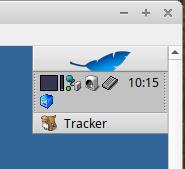
4). インストールで追加された「VBoxTray」を起動してみました:
メニュー(右か左上隅の青い葉)→「Desktop applets」→「VBoxTray」
パネルの 2段目に「青色のbox」のアイコンが追加されました:
-
マウスカーソルを持って行くと、バージョンの確認ができました:
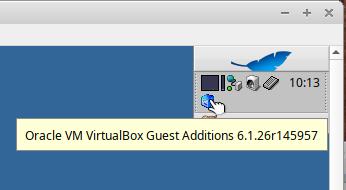
→バージョンは、「Orcle VM VirtualBox Guest Additions 6.1.26r145957」です:
ちなみに、バージョン 7.0 以上は「VirtualBox Guest Additions 7.xxxxx」となります:
-
クリックすると「Quit」が表示:
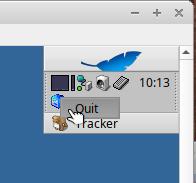
→これで「VBoxTray」の「終了」ができるみたい:
-
5). 「VirtualBox Guest Additions」の個々の機能の有効化:
-
(1). 「解像度の自動調整」機能の有効化:
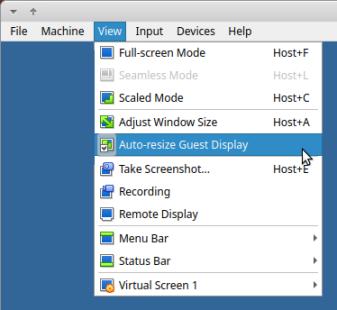
→チェックが付いたアイコンであることを確認:
-
(2). 「クリップボードの共有」機能の有効化(双方向):
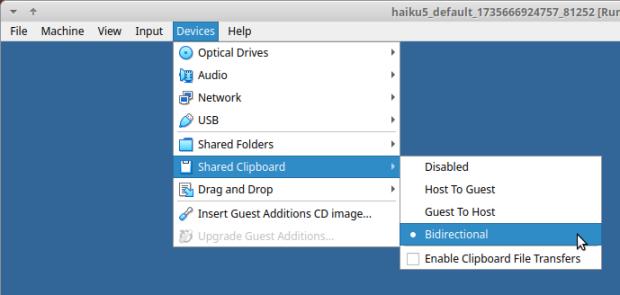
-
(3). 「ドラッグ&ドロップ」機能の有効化(双方向):
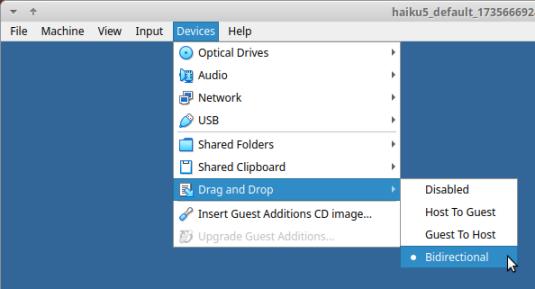
-
6). 「仮想マシン」の再起動:
-
(1). 「仮想マシン」の停止:
$ vagrant halt
==> default: Attempting graceful shutdown of VM...
ubn@ubnbox:~/ダウンロード/vm/haiku5$
-
(2). 「仮想マシン」を立ち上げ:
$ cd ~/ダウンロード/vm/haiku5
$ vagrant up
→「仮想マシン」の画面が表示されました:
パネルの 2段目に「青色のbox」のアイコンが表示されています:
起動すると、常駐するみたい:
-
7). 「仮想マシン」の画面を横に広げてみました:
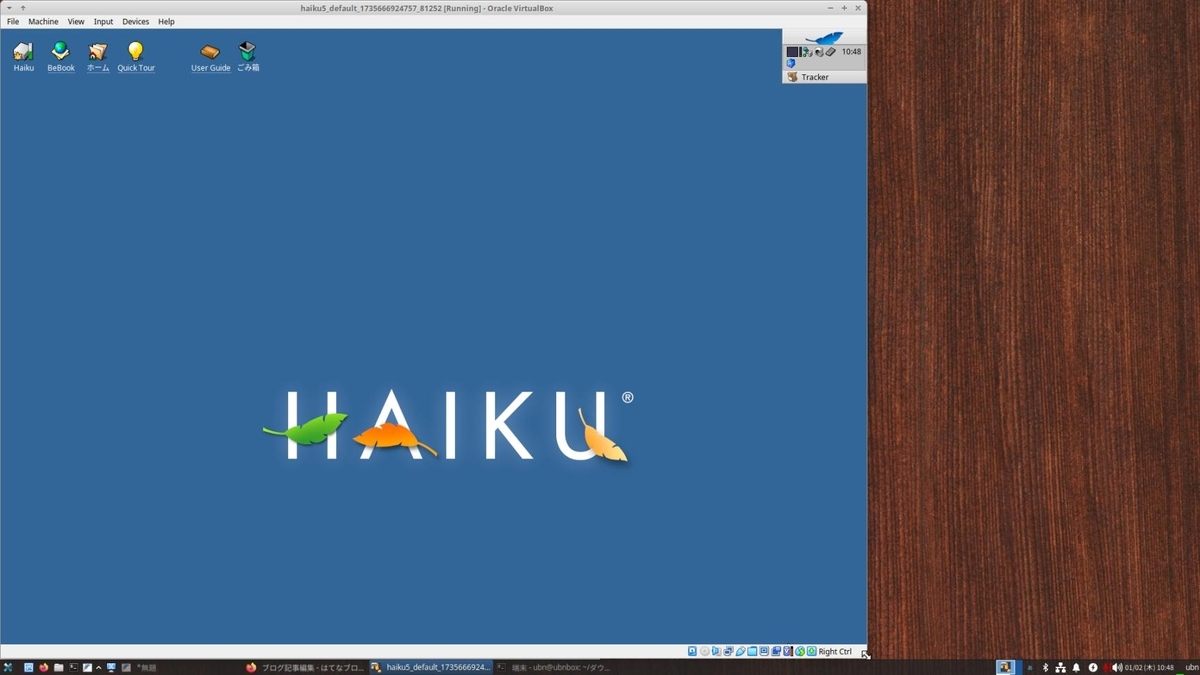
↓ 画面右下をマウスでドラッグして、横に拡げました:
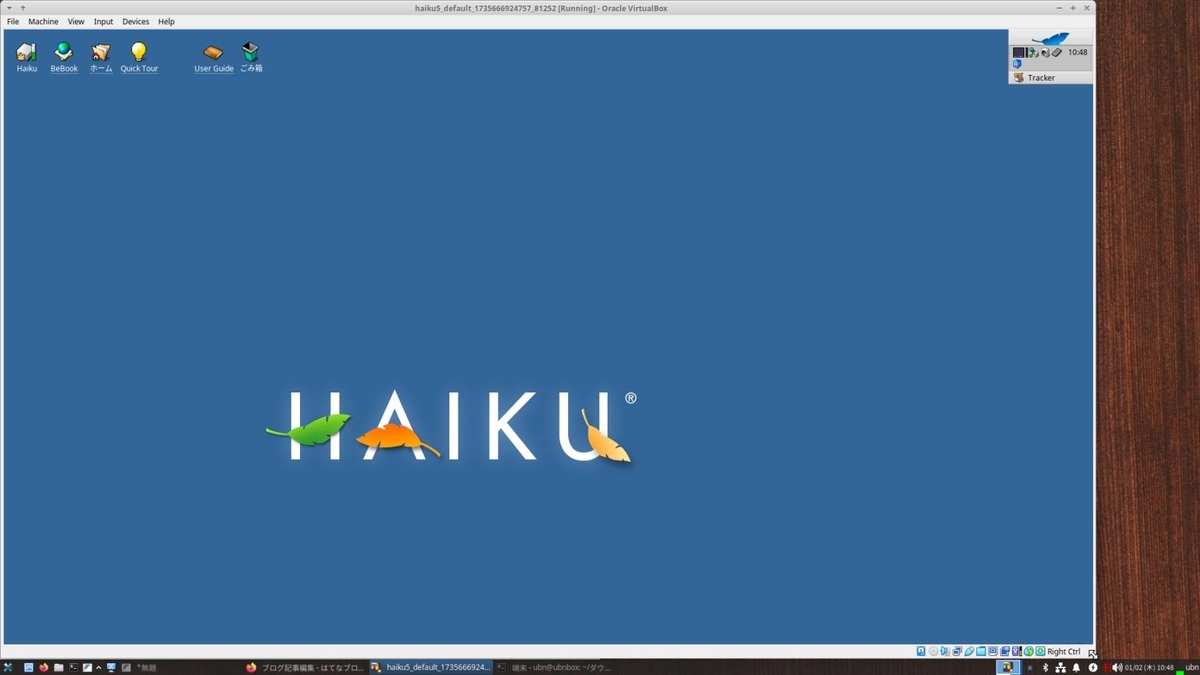
→リアルタイムに解像度が調整されました:
-
「仮想マシン」の「グラフィックコントローラー」は、「VBoxVGA」の設定にする必要があります:
-
8). GUI の「ターミナル」を起動して、「コピー」と「貼り付け」を確認:
「クリップボードの共有」機能の動作確認です:
一度、テキストファイルに落とすのがコツでした:
コピー後、Haiku で「テキストファイル」に貼り付けてから、それを範囲指定して、右クリック→コピー
-
ホストOS のアプリで、右クリック→貼り付け
Welcome to the Haiku shell.
~/Desktop>
→Haiku の「ターミナル」のメッセージが貼り付けできました:
-
ssh 接続すれば、「端末」での「コピー」と「貼り付け」は自由に行えるので、 それ以外に必要になったときに、必要です:
-
9). 「仮想マシン」の停止:
$ vagrant halt
==> default: Attempting graceful shutdown of VM...
ubn@ubnbox:~/ダウンロード/vm/haiku5$
-
-
--- - --- - --- - --- - --- - --- - --- - --- - --- - --- - --- - --- - --- - --- - --- - --- - --- - --- - --- - --- - ---
参考: 移植元
違うバージョンが、ひとつのパッケージとしてまとめられています:
うまく動くためにバージョンを合わせるには、バージョンごとに、パッケージを分ける必要がありそう:
GitHub: haikuports/haikuports/app-emulation/virtualbox-guest-additions
virtualbox_guest_additions-4.3.12.recipe
virtualbox_guest_additions-5.1.26.recipe
virtualbox_guest_additions-6.1.26.recipe
patches/virtualbox_guest_additions-4.3.12.patchset
patches/virtualbox_guest_additions-5.1.26.patchset
patches/virtualbox_guest_additions-6.1.26.patchset
-
--- - --- - --- - --- - --- - --- - --- - --- - --- - --- - --- - --- - --- - --- - --- - --- - --- - --- - --- - --- - ---
参考: アプリ関連のファイルを表示:
~> find /boot/ | grep "/VBox" | sort | grep "/VBox"
:
/boot/system/add-ons/input_server/devices/VBoxMouse
/boot/system/add-ons/input_server/filters/VBoxMouseFilter
/boot/system/bin/VBoxControl
/boot/system/bin/VBoxService
/boot/system/bin/VBoxTray                                   ←「注目」
/boot/system/data/deskbar/menu/Desktop applets/VBoxTray     ←「注目」
メニューに「VBoxTray」の登録があります:
-
~> find /boot/ | grep "/vbox" | sort | grep "/vbox"
:
/boot/system/add-ons/accelerants/vboxvideo.accelerant
/boot/system/add-ons/kernel/drivers/bin/vboxdev
/boot/system/add-ons/kernel/drivers/bin/vboxvideo
/boot/system/add-ons/kernel/drivers/dev/graphics/vboxvideo
/boot/system/add-ons/kernel/drivers/dev/misc/vboxdev
/boot/system/add-ons/kernel/file_systems/vboxsf
/boot/system/add-ons/kernel/generic/vboxguest              ←「注目」
-
~> find /boot/ | grep "vbox" | sort | grep "vbox"
:
/boot/home/config/settings/mime_db/application/x-vnd.oracle-vboxguest ←「注目」
/boot/system/add-ons/accelerants/vboxvideo.accelerant
/boot/system/add-ons/kernel/drivers/bin/vboxdev
/boot/system/add-ons/kernel/drivers/bin/vboxvideo
/boot/system/add-ons/kernel/drivers/dev/graphics/vboxvideo
/boot/system/add-ons/kernel/drivers/dev/misc/vboxdev
/boot/system/add-ons/kernel/file_systems/vboxsf
/boot/system/add-ons/kernel/generic/vboxguest
/boot/system/data/mime_db/application/x-vnd.oracle-vboxguest ←「注目」
→検索漏れに注意:
-
-
- --- - --- - --- - --- - --- - --- - --- - --- - ----- ----- ----- --
15. 「VagrantFile」にて、「共有フォルダ」の指定を除外:
--- - --- - --- - --- - --- - --- - --- - --- - --- - --- - --- - --- - --- - --- - --- - --- - --- - --- - --- - --- - ---
「仮想マシン」の立ち上げ時に「共有フォルダ」のマウントでエラーするので、
「VagrantFile」にある「共有フォルダ」の指定を除外しました:
-
「項番 17.」で試してみたところ、
Haiku ゲストの「共有フォルダ」機能を使えるようにするには、 「VirtualBox」と「VirtualBox Guest Additions」のバージョンを合わせてみるしかなさそう。
-
つまり、今の「VirtualBox 7.1.4」だとバージョンが合わない(ことが原因とは断定できないけど)ので、「共有フォルダ」機能は使えません:
逆に、ホストOS を「VirtualBox 6.1.26」限定でダウンして、
Haiku で「VirtualBox Guest Additions」パッケージをインストールすれば、Haiku ゲストの「共有フォルダ」機能が使えるかもしれません。
-
ただし、そこまでする必要はありません。
ブラウザを使い、Gmail で自分宛の下書き(送信せずに閉じればOK)に(複数であれば zip にした)ファイルを添付したり、短い文字列であれば、本文に貼り付ければ、機能を代替えできます:
-
1). 「VagrantFile」を修正(「共有フォルダ」機能を除外):
今のところ「共有フォルダ」機能は使えません:
-
$ cd ~/ダウンロード/vm/haiku5
$ nano Vagrantfile
Ctrl+K を数回押して、既存のすべての行を削除:
↓ 下の行をすべて範囲選択後、右クリックで「コピー」して「貼り付け」
# -*- mode: ruby -*-
# vi: set ft=ruby :

Vagrant.configure("2") do |config|
  config.vm.box = "haiku-os/r1beta4-x86_64"
  # ホストの作業フォルダ内の data フォルダと
  # 仮想マシン内の /boot/home/My/vagrant_data フォルダを共有:
  # 指定のフォルダがない場合は、フォルダを作成:
  # config.vm.synced_folder "./data", "/boot/home/My/vagrant_data", create: true
  # デフォルトの共有フォルダを無効にします:
  config.vm.synced_folder ".", "/vagrant", disabled: true
  config.vm.provider "virtualbox" do |vb|
    # 仮想マシンの起動時に VirtualBox 画面 を表示:
    vb.gui = true
  end
end
-
→Crtl+O で保存先を確認して、Enter で保存
→Crtl+X で、終了
-
参考:「config.vm.box = 」と「config.vm.box_version = 」の行の指定(省略時は最新バージョン)を変えれば、他の「仮想マシン」でも使い回し出来ます:
-
2). 正しく修正されたか確認:
$ cd ~/ダウンロード/vm/haiku5
$ cat Vagrantfile
-
3). ホストOS を再起動:
「端末」以外のすべての画面を閉じてから、
$ reboot
-
4). 「仮想マシン」に(GUI 表示と共有フォルダを指定して)修正した Vagrantfile を反映:
$ cd ~/ダウンロード/vm/haiku5
$ vagrant reload
==> default: Checking if box 'haiku-os/r1beta4-x86_64' version '20230114' is up to date...
==> default: Clearing any previously set forwarded ports...
==> default: Clearing any previously set network interfaces...
==> default: Preparing network interfaces based on configuration...
    default: Adapter 1: nat
==> default: Forwarding ports...
    default: 22 (guest) => 2222 (host) (adapter 1)
==> default: Booting VM...
==> default: Waiting for machine to boot. This may take a few minutes...
    default: SSH address: 127.0.0.1:2222
    default: SSH username: vagrant
    default: SSH auth method: private key
==> default: Machine booted and ready!
赤い警告1:
Sorry, don't know how to check guest version of Virtualbox Guest Additions
on this platform. Stopping installation.
==> default: Checking for guest additions in VM...
    default: The guest additions on this VM do not match the installed version of
    default: VirtualBox! In most cases this is fine, but in rare cases it can
    default: prevent things such as shared folders from working properly. If you see
    default: shared folder errors, please make sure the guest additions within the
    default: virtual machine match the version of VirtualBox you have installed on
    default: your host and reload your VM.
    default:
    default: Guest Additions Version: 6.1.26 r145957
    default: VirtualBox Version: 7.1
==> default: Machine already provisioned. Run `vagrant provision` or use the `--provision`
==> default: flag to force provisioning. Provisioners marked to run always will still run.
ubn@ubnbox:~/ダウンロード/vm/haiku5$
→「共有フォルダ」機能は除外したので、そのエラー表示は消えました:
-
-
- --- - --- - --- - --- - --- - --- - --- - --- - ----- ----- ----- ---
16. 「Haiku」にオススメの「アプリ」や「機能」をインストール:
--- - --- - --- - --- - --- - --- - --- - --- - --- - --- - --- - --- - --- - --- - --- - --- - --- - --- - --- - --- - ---
今のところ、Haiku では、古くからあるHaiku (BeOS) のアプリと、Linux から移植されたアプリが使えます:
-
アプリ一覧:
-
(1). 追加すると便利な機能「CopyNameToClipboard」:
-
(2). 「Web」ブラウザ:
-
(3). PDF ビュワー「qPDFView」:
-
(4). 画像加工ソフト「KolourPaint」:
-
(5). テキストエディタ「Featherpad」:
-
(6). 「TakeNotes」(ワープロに近い付箋):
-
(7). オフィスソフト「LibreOffice」:
-
-
- --- - --- - --- - --- - --- - --- - --- - --- - ----- ----- ----- ----
17. 参考: 「VagrantFile」を修正して「共有フォルダ」の有効化を試したときの覚書き:
--- - --- - --- - --- - --- - --- - --- - --- - --- - --- - --- - --- - --- - --- - --- - --- - --- - --- - --- - --- - ---
色々とトライしたことの覚書きなので、作業は要りません:
-
「仮想マシン」の立ち上げ時に「共有フォルダ」のマウントでエラーするので、 「VagrantFile」を色々と修正してトライしました。
-
→結論は、バージョンを合わせないと、「共有フォルダ」機能は使えないみたい:
-
1). 「VagrantFile」の修正1:
$ cd ~/ダウンロード/vm/haiku5
$ nano Vagrantfile
Ctrl+K を数回押して、既存のすべての行を削除:
↓ 下の行をすべて範囲選択後、右クリックで「コピー」して「貼り付け」
# -*- mode: ruby -*-
# vi: set ft=ruby :

Vagrant.configure("2") do |config|
  config.vm.box = "haiku-os/r1beta4-x86_64"
  # ホストの作業フォルダ内の data フォルダと
  # 仮想マシン内の /boot/home/My/vagrant_data フォルダを共有:
  # 指定のフォルダがない場合は、フォルダを作成:
  config.vm.synced_folder "./data", "/boot/home/My/vagrant_data", create: true
  # デフォルトの共有フォルダを無効にします:
  config.vm.synced_folder ".", "/vagrant", disabled: true
  config.vm.provider "virtualbox" do |vb|
    # 仮想マシンの起動時に VirtualBox 画面 を表示:
    vb.gui = true
  end
end
-
→Crtl+O で保存先を確認して、Enter で保存
→Crtl+X で、終了
-
参考:「config.vm.box = 」と「config.vm.box_version = 」の行の指定(省略時は最新バージョン)を変えれば、他の「仮想マシン」でも使い回し出来ます:
-
2). 正しく修正されたか確認:
$ cd ~/ダウンロード/vm/haiku5
$ cat Vagrantfile
-
3). ホストOS を再起動:
「端末」以外のすべての画面を閉じてから、
$ reboot
-
4). 「仮想マシン」に(GUI 表示と共有フォルダを指定して)修正した Vagrantfile を反映:
$ cd ~/ダウンロード/vm/haiku5
$ vagrant reload
==> default: Checking if box 'haiku-os/r1beta4-x86_64' version '20230114' is up to date...
==> default: Clearing any previously set forwarded ports...
==> default: Clearing any previously set network interfaces...
==> default: Preparing network interfaces based on configuration...
    default: Adapter 1: nat
==> default: Forwarding ports...
    default: 22 (guest) => 2222 (host) (adapter 1)
==> default: Booting VM...
==> default: Waiting for machine to boot. This may take a few minutes...
    default: SSH address: 127.0.0.1:2222
    default: SSH username: vagrant
    default: SSH auth method: private key
==> default: Machine booted and ready!
赤い警告1:
Sorry, don't know how to check guest version of Virtualbox Guest Additions
on this platform. Stopping installation.
==> default: Checking for guest additions in VM...
    default: The guest additions on this VM do not match the installed version of
    default: VirtualBox! In most cases this is fine, but in rare cases it can
    default: prevent things such as shared folders from working properly. If you see
    default: shared folder errors, please make sure the guest additions within the
    default: virtual machine match the version of VirtualBox you have installed on
    default: your host and reload your VM.
    default:
    default: Guest Additions Version: 6.1.26 r145957
    default: VirtualBox Version: 7.1
==> default: Mounting shared folders...
    default: /home/ubn/ダウンロード/vm/haiku5/data => /boot/home/My/vagrant_data
赤い警告2:
Vagrant attempted to execute the capability 'mount_virtualbox_shared_folder'
on the detect guest OS 'haiku', but the guest doesn't
support that capability. This capability is required for your
configuration of Vagrant. Please either reconfigure Vagrant to
avoid this capability or fix the issue by creating the capability.
ubn@ubnbox:~/ダウンロード/vm/haiku5$
-
5). ssh 接続:
$ cd ~/ダウンロード/vm/haiku5
$ vagrant ssh
Welcome to the Haiku shell.
~>
-
~> pwd
/boot/home
~> ls
config  Desktop  mail  My
~> ls My
Doc  Downloads  Music  Pic
→今回は、自動でフォルダは作成されませんでした:
-
6). 手動で「共有フォルダ」のマウント先を作成:
~> mkdir -p /boot/home/My/vagrant_data
~> ls My
Doc  Downloads  Music  Pic  vagrant_data
-
7). ssh 接続を抜けました:
~> exit
logout
ubn@ubnbox:~/ダウンロード/vm/haiku5$
-
8). 「仮想マシン」の停止:
$ vagrant halt
:
==> default: Attempting graceful shutdown of VM...
ubn@ubnbox:~/ダウンロード/vm/haiku5$
-
9). フォルダを手動で作成したので、どうなるか「仮想マシン」を立ち上げ:
$ cd ~/ダウンロード/vm/haiku5
$ vagrant reload
==> default: Checking if box 'haiku-os/r1beta4-x86_64' version '20230114' is up to date...
==> default: Clearing any previously set forwarded ports...
==> default: Clearing any previously set network interfaces...
==> default: Preparing network interfaces based on configuration...
    default: Adapter 1: nat
==> default: Forwarding ports...
    default: 22 (guest) => 2222 (host) (adapter 1)
==> default: Booting VM...
==> default: Waiting for machine to boot. This may take a few minutes...
    default: SSH address: 127.0.0.1:2222
    default: SSH username: vagrant
    default: SSH auth method: private key
==> default: Machine booted and ready!
赤い警告1:
Sorry, don't know how to check guest version of Virtualbox Guest Additions
 on this platform. Stopping installation.
==> default: Checking for guest additions in VM...
    default: The guest additions on this VM do not match the installed version of
    default: VirtualBox! In most cases this is fine, but in rare cases it can
    default: prevent things such as shared folders from working properly. If you see
    default: shared folder errors, please make sure the guest additions within the
    default: virtual machine match the version of VirtualBox you have installed on
    default: your host and reload your VM.
    default:
    default: Guest Additions Version: 6.1.26 r145957
    default: VirtualBox Version: 7.1
==> default: Mounting shared folders...
    default: /home/ubn/ダウンロード/vm/haiku5/data => /boot/home/My/vagrant_data ←「注目」
赤い警告2:
Vagrant attempted to execute the capability 'mount_virtualbox_shared_folder'
on the detect guest OS 'haiku', but the guest doesn't
support that capability. This capability is required for your
configuration of Vagrant. Please either reconfigure Vagrant to
avoid this capability or fix the issue by creating the capability.
ubn@ubnbox:~/ダウンロード/vm/haiku5$
和訳:
Vagrant は、検出ゲスト OS 'haiku' で機能 'mount_virtualbox_shared_folder' を
実行しようとしましたが、ゲストはその機能をサポートしていません。
この機能は Vagrant の構成に必要です。この機能を回避するように Vagrant を再設定するか、
機能を作成して問題を解決してください。
→やはり、バージョンを合わせないと、「共有フォルダ」機能は使えないみたい:
-
「仮想マシン」に自動的に設定された内容:

→ゲストOS 側のマウントポイントが、Name の欄にあり、パスが有効なのかが不明。
立ち上げメッセージではOK のように見えます:
-
10). 「仮想マシン」の停止:
$ vagrant halt
:
==> default: Attempting graceful shutdown of VM...
ubn@ubnbox:~/ダウンロード/vm/haiku5$
-
11). 「VagrantFile」を修正2(「共有フォルダ」機能を除外):
今のところ「共有フォルダ」機能は使えないので、エラー回避のため除外:
-
$ cd ~/ダウンロード/vm/haiku5
$ nano Vagrantfile
Ctrl+K を数回押して、既存のすべての行を削除:
↓ 下の行をすべて範囲選択後、右クリックで「コピー」して「貼り付け」
# -*- mode: ruby -*-
# vi: set ft=ruby :

Vagrant.configure("2") do |config|
  config.vm.box = "haiku-os/r1beta4-x86_64"
  # ホストの作業フォルダ内の data フォルダと
  # 仮想マシン内の /boot/home/My/vagrant_data フォルダを共有:
  # 指定のフォルダがない場合は、フォルダを作成:
  # config.vm.synced_folder "./data", "/boot/home/My/vagrant_data", create: true
  # デフォルトの共有フォルダを無効にします:
  config.vm.synced_folder ".", "/vagrant", disabled: true
  config.vm.provider "virtualbox" do |vb|
    # 仮想マシンの起動時に VirtualBox 画面 を表示:
    vb.gui = true
  end
end
-
→Crtl+O で保存先を確認して、Enter で保存
→Crtl+X で、終了
-
参考:「config.vm.box = 」と「config.vm.box_version = 」の行の指定(省略時は最新バージョン)を変えれば、他の「仮想マシン」でも使い回し出来ます:
-
12). 正しく修正されたか確認:
$ cd ~/ダウンロード/vm/haiku5
$ cat Vagrantfile
-
13). ホストOS を再起動:
「端末」以外のすべての画面を閉じてから、
$ reboot
-
14). 「仮想マシン」に(GUI 表示と共有フォルダを指定して)修正した Vagrantfile を反映:
$ cd ~/ダウンロード/vm/haiku5
$ vagrant reload
==> default: Checking if box 'haiku-os/r1beta4-x86_64' version '20230114' is up to date...
==> default: Clearing any previously set forwarded ports...
==> default: Clearing any previously set network interfaces...
==> default: Preparing network interfaces based on configuration...
    default: Adapter 1: nat
==> default: Forwarding ports...
    default: 22 (guest) => 2222 (host) (adapter 1)
==> default: Booting VM...
==> default: Waiting for machine to boot. This may take a few minutes...
    default: SSH address: 127.0.0.1:2222
    default: SSH username: vagrant
    default: SSH auth method: private key
==> default: Machine booted and ready!
赤い警告1:
Sorry, don't know how to check guest version of Virtualbox Guest Additions
on this platform. Stopping installation.
==> default: Checking for guest additions in VM...
    default: The guest additions on this VM do not match the installed version of
    default: VirtualBox! In most cases this is fine, but in rare cases it can
    default: prevent things such as shared folders from working properly. If you see
    default: shared folder errors, please make sure the guest additions within the
    default: virtual machine match the version of VirtualBox you have installed on
    default: your host and reload your VM.
    default:
    default: Guest Additions Version: 6.1.26 r145957
    default: VirtualBox Version: 7.1
==> default: Machine already provisioned. Run `vagrant provision` or use the `--provision`
==> default: flag to force provisioning. Provisioners marked to run always will still run.
ubn@ubnbox:~/ダウンロード/vm/haiku5$
→「共有フォルダ」機能は除外したので、エラー表示は 1つになりました:
-
今のところ、こちらが最終的な設定になりました:
-
-
まとめ
今回は、「VirtualBox 7.1.4」の「Vagrant」で「仮想マシン」に「Haiku R1/beta5」をインストールしました。
まだ「Haiku R1/beta5」は、公式ボックスとしてアップされていないので、「Vagrant」で「Haiku R1/beta4」をインストールして最新にした後に、「Haiku R1/beta5」にアップグレードして、日本語化しました。
-
また、バージョンが違う「Guest Additions」でしたが、インストールで「クリップボードの共有」機能と「解像度の自動調整」機能が使えるようになりました。(感謝 !)。
ただし、「共有フォルダ」機能は(バージョンが違うからか)うまく動きませんでした。
-
移植ができたらと思ったものは、
既存のバージョンとは別のパッケージとして分けた
「Guest Additions 7.1.4」パッケージ と、
「109 日本語キーボード」のレイアウトファイル です。
どちらもあると便利ですが、作るのは大変そう。
-
「Vagrant」で「仮想マシン」を作成しましたが、 色々とトライしたのに楽に感じるのは、「Haiku」の起動やアプリのインストールが速いからかも。 チリも積もれば、です。マルチスレッドで動くし、使い慣れた bash だし、もしかしたら「開発環境」に向いているのかも。
-
-
-
-
-
目次
-
-
- 目次
- Xubuntu 24.04.1 LTS を立ち上げ:
- 現在のOS のバージョンを表示:
- - --- - --- - --- - --- - --- - --- - --- - --- - -
- VirtualBox について:
- - --- - --- - --- - --- - --- - --- - --- - --- - --
- Haiku について:
- - --- - --- - --- - --- - --- - --- - --- - --- - ---
- 1. 前回の作業の続き:
- - --- - --- - --- - --- - --- - --- - --- - --- - ----
- 2. Vagrant の公式のBox サイトで「Haiku」を検索:
- - --- - --- - --- - --- - --- - --- - --- - --- - -----
- 3. 「Vagrant」でBox から「仮想マシン」を作成:
- - --- - --- - --- - --- - --- - --- - --- - --- - ----- -
- 4. 「VirtualBox マネージャ」で、「仮想マシン」の設定を確認
- - --- - --- - --- - --- - --- - --- - --- - --- - ----- --
- 5. 「ssh 接続」して確認:
- - --- - --- - --- - --- - --- - --- - --- - --- - ----- ---
- 6. 「Haiku R1/beta4」にて、「システム更新」:
- - --- - --- - --- - --- - --- - --- - --- - --- - ----- ----
- 7. 「Haiku R1/beta4」を「Haiku R1/beta5」にアップグレード:
- - --- - --- - --- - --- - --- - --- - --- - --- - ----- -----
- 8. 念の為、「仮想マシン」を「reload」で立ち上げ:
- - --- - --- - --- - --- - --- - --- - --- - --- - ----- ----- -
- 9. 「Haiku R1/beta5」にて、「システム更新」:
- - --- - --- - --- - --- - --- - --- - --- - --- - ----- ----- --
- 10. 「Haiku R1/beta5」を日本語化:
- - --- - --- - --- - --- - --- - --- - --- - --- - ----- ----- ---
- 11. 個人のデータ保存用にフォルダ「My」を作成:
- - --- - --- - --- - --- - --- - --- - --- - --- - ----- ----- ----
- 12. 「日本語キーボード」の設定:
- - --- - --- - --- - --- - --- - --- - --- - --- - ----- ----- -----
- 13. 日本語入力:
- - --- - --- - --- - --- - --- - --- - --- - --- - ----- ----- ----- -
- 14. 「Haiku」の仮想マシンに、「VirtualBox Guest Additions」をインストール:
- 「VirtualBox Guest Additions」パッケージが「Haiku」に移植されていました:
- 1). 「VirtualBox Guest Additions」を検索:
- 2). インストール:
- 3). 「仮想マシン」の再起動:
- 4). インストールで追加された「VBoxTray」を起動してみました:
- 5). 「VirtualBox Guest Additions」の個々の機能の有効化:
- 6). 「仮想マシン」の再起動:
- 7). 「仮想マシン」の画面を横に広げてみました:
- 8). GUI の「ターミナル」を起動して、「コピー」と「貼り付け」を確認:
- 9). 「仮想マシン」の停止:
- 参考: 移植元
- 参考: アプリ関連のファイルを表示:
- - --- - --- - --- - --- - --- - --- - --- - --- - ----- ----- ----- --
- 15. 「VagrantFile」にて、「共有フォルダ」の指定を除外:
- - --- - --- - --- - --- - --- - --- - --- - --- - ----- ----- ----- ---
- 16. 「Haiku」にオススメの「アプリ」や「機能」をインストール:
- - --- - --- - --- - --- - --- - --- - --- - --- - ----- ----- ----- ----
- 17. 参考: 「VagrantFile」を修正して「共有フォルダ」の有効化を試したときの覚書き:
- →結論は、バージョンを合わせないと、「共有フォルダ」機能は使えないみたい:
- 1). 「VagrantFile」の修正1:
- 2). 正しく修正されたか確認:
- 3). ホストOS を再起動:
- 4). 「仮想マシン」に(GUI 表示と共有フォルダを指定して)修正した Vagrantfile を反映:
- 5). ssh 接続:
- 6). 手動で「共有フォルダ」のマウント先を作成:
- 7). ssh 接続を抜けました:
- 8). 「仮想マシン」の停止:
- 9). フォルダを手動で作成したので、どうなるか「仮想マシン」を立ち上げ:
- 10). 「仮想マシン」の停止:
- 11). 「VagrantFile」を修正2(「共有フォルダ」機能を除外):
- 12). 正しく修正されたか確認:
- 13). ホストOS を再起動:
- 14). 「仮想マシン」に(GUI 表示と共有フォルダを指定して)修正した Vagrantfile を反映:
- まとめ
- -
-
-
-
